With the Draw by groups option in the Easypromos Pick-a-Winner App, you can import a single participant list, choose the column that identifies each group, and automatically run an independent random drawing for every group. The same winner and alternate configuration is applied across all of them.
This means you can pick random winners by group without splitting your database into separate files or running each drawing manually. In this guide, we’ll show you how it works and the most common ways to use it.
What Is a Random Draw by Groups?
A random draw by groups automatically divides participants from a single imported list into separate groups and selects winners independently within each one.
The group can be based on any field included in your file, such as store, category, location, country, branch, company, language, or selected prize.
For example, imagine a retail chain with 100 stores that wants to select one winner from each location. Instead of creating 100 separate lists and running 100 individual drawings, you can import one participant list with a Store column. Easypromos detects the 100 stores automatically and runs an independent random drawing for each one.
Your list does not need to be sorted by group beforehand. During import, simply map the relevant column to the Group field, and Easypromos will organize the participants automatically.
| Need | Column used as group | Result |
|---|---|---|
| Reward participants from different sports categories | Category | Winners by category |
| Select one winner per location | Store | Winners by store |
| Reward employees from different offices | Branch | Winners by branch |
| Run a campaign across multiple markets | Country or language | Winners by market |
| Distribute tickets for different concerts | Selected concert | Winners by concert |
| Reward salespeople from different distributors | Distributor | Winners by company |
How to Run Multiple Drawings From One Participant List
Start with one file containing all participants and add a column that identifies the group for each record. This could be a Store, Category, Country, Branch, or any other field you want to use for the drawing.
For example:
| Name | Store | |
|---|---|---|
| Laura Garrison | laura@example.com | Paris 03 |
| Mark Lewis | mark@example.com | Barcelona 01 |
| Annabel Ruiz | anna@example.com | Paris 03 |
| David Hudson | david@example.com | London 02 |
When you import the file into the Pick-a-Winner App, map the Store column to the Group field. Easypromos automatically detects the different values and shows how many participants belong to each group before you run the drawing.
Next, choose the number of winners and alternates. The same configuration applies to every group. For example, if you select two winners and three alternates and your list contains 50 stores, Easypromos will run 50 independent drawings and select two winners and three alternates from each store.
If you need more detailed setup instructions, see the Draw by groups configuration guide.
Common Use Cases for Random Draws by Groups
Select Winners by Category
Imagine a sports club event with participants from several categories, such as youth, junior, senior, or women’s teams. You want to run a drawing among everyone attending while also making sure each category has its own winners.
Instead of separating participants into different files, you can use a single list with a Category column. Easypromos automatically groups the participants and runs an independent random drawing within each category.
The same approach can be used for events, associations, competitions, loyalty programs, or any campaign where participants are already classified into different groups.
Pick a Winner From Every Store
This is especially useful for retailers, supermarkets, restaurant chains, and other organizations with many locations.
Imagine a campaign involving customers from more than 600 stores, with one prize to be awarded at each location. Managing the process manually would mean separating participants by store, running hundreds of drawings, and then handling all the results individually.
With a random draw by groups, the central team can work from a single participant list with a column identifying each store or location. Easypromos then runs an independent random drawing among the participants from each location.
The more stores involved in the campaign, the greater the operational advantage of managing all the drawings from one list instead of creating and running them separately.
Guarantee a Winner From Every Branch
The same approach works for internal promotions. For example, a travel agency chain may want to run a drawing among all employees while guaranteeing one winner from every branch.
The organizer only needs to include a Branch or Office column in the employee list. Easypromos can then run all the selections at once and organize the results by location. Departments, workplaces, regional offices, or geographic areas can also be used as grouping criteria.
Select Winners by Country or Language
International campaigns may use the same participation mechanic across several markets while still requiring separate winners for each country or language. For example, a brand might encourage customers to register purchase receipts and run recurring drawings among participants in three different markets.
If the participant list includes a Country or Language column, that field can be used to create the groups and run independent winner selections for each market. This is especially useful for recurring campaigns because the same process can be repeated weekly or monthly without preparing separate lists or drawings for every market.
Award Different Prizes Based on Participant Choice
Groups do not have to represent a participant characteristic. They can also be based on the prize each participant wants to win.
For example, imagine a home appliance brand offering tickets to several concerts at a music festival. During registration, each customer chooses which concert they would like to attend. At the end of the campaign, the organizer has a single participant list with a Selected concert column.
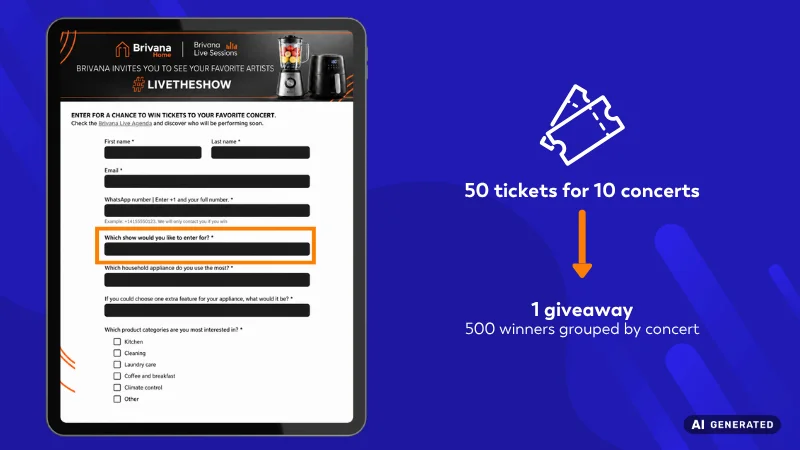
Each concert then becomes its own group. With Easypromos, you can run an independent random drawing for each one, so every winner remains associated with the prize they originally selected.
Reward Participants From Different Companies or Distributors
Another option is to use the participant’s company or distributor as the grouping criterion.
For example, a frozen food manufacturer might run an incentive campaign to reward sales teams from several distribution companies.
The organizer can import a single participant list with a Distributor column identifying the company each person belongs to. With Easypromos, the organizer then runs an independent random drawing for each distributor, without requiring separate participant lists for every company.
What Are the Benefits of Running Random Draws by Groups?
The main advantage is not simply being able to run multiple drawings at once. It is avoiding the manual work that quickly adds up when a campaign includes many groups.
With the Draw by groups option, you can:
- Work from a single participant list
- Avoid manually separating records by store, country, category, branch, or another criterion
- Automatically run an independent random drawing for each group
- Select winners and alternates for every group using the same configuration
- View and export results together or by group
- Maintain clear traceability for every winner selection
Easypromos also generates a Certificate of Validity for each independent drawing, as well as a global Winners Page that brings together the results from all groups.
How to Announce Winners When You Have Many Groups
Announcing results is simple when a drawing has only a few winners. But if your campaign includes, for example, 300 stores with several winners at each location, participants need an easy way to find the result that applies to them.
The global Winners Page for random draws by groups brings all selections together in one place. Results are organized by group, and the page includes a search feature to help participants find specific winners.
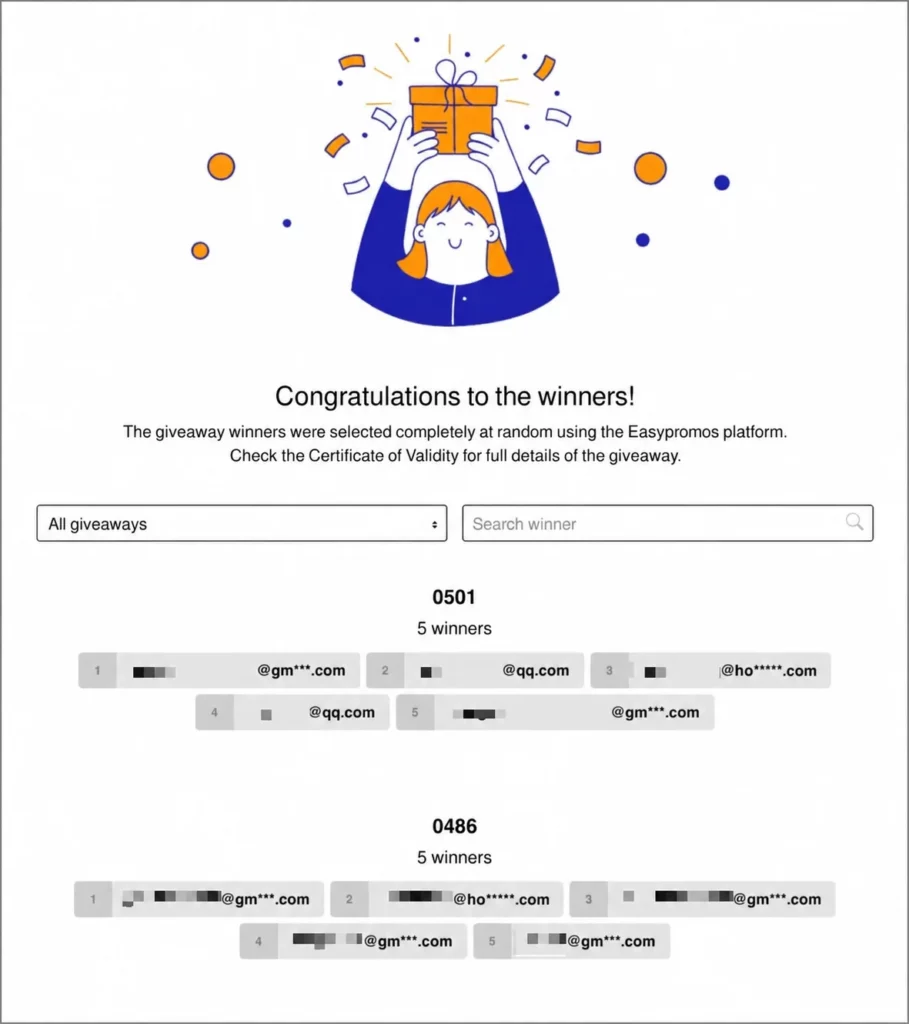
This means you can share a single Winners Page even when the drawing includes dozens or hundreds of stores, categories, branches, or markets. You can also publish the corresponding Certificates of Validity for the different selections.
What if You Want to Announce Each Winner Separately?
There is another scenario where you have a single participant list and want to select several winners, but prefer to announce each result individually, for example with a countdown video before revealing each name.
In this case, you can use the Pick-a-Winner App together with the Repeat Drawing option. This lets you run new winner selections from the same participant list and present each result separately. Pasted text
Random Draws by Groups FAQs
Yes. Include a column identifying each participant’s store and use it as the Group field. Easypromos will automatically run an independent random drawing among participants from each store.
No. You can import all participants in a single file. You only need a column identifying the category or group associated with each record.
No. Easypromos detects the different values in the column used as the Group field and automatically organizes participants accordingly.
Yes. You can define the number of winners and alternates you want, and the same configuration will apply to every group. For example, you could select five winners and two alternates from each store.
Not within the same drawing. The number of winners and alternates configured applies equally to all groups.
Yes. The group can be based on any criterion included as a column in your file, such as store, category, branch, country, language, company, selected prize, or another classification.
Easypromos generates a global Winners Page where participants can view results from all groups and search for a specific winner. You can also generate the corresponding Certificates of Validity and download a file containing information about all winners.