To announce the winners of a giveaway on Instagram, Facebook, or X, you can publish a Winners Page, share a countdown video, or provide the giveaway’s Certificate of Validity. Each resource serves a different purpose: the Winners Page makes it easy to check the results, the video creates a more engaging reveal, and the Certificate of Validity documents that the winners were selected at random.
It is important to announce the winners on the date stated in the giveaway rules and communicate the results across the relevant channels. We also recommend giving participants a way to check the results afterward, without relying exclusively on temporary formats such as Instagram Stories.
With Easypromos, our digital engagement platform, we provide several ways to communicate giveaway results clearly, engagingly, and transparently, helping strengthen participants’ trust in your brand.
Publish the Results on a Winners Page
One of the clearest ways to communicate giveaway results is to use a public Winners Page with its own URL, where participants can check who won.
When you run an Instagram, Facebook, or X giveaway with Easypromos, a Winners Page is generated automatically. You can customize it with your brand identity and share it through a public link.
The page allows you to:
- Display the names of the winners and, optionally, the alternates
- Customize the text, images, and visual elements
- Include a link to the giveaway’s Certificate of Validity.
- Add access to Claim Your Prize, if the feature is enabled
- Share the results through social media, email, or any other communication channel
The main advantage is that all the information is centralized on a public page that participants can revisit after the announcement, rather than relying only on social media posts.nuncio, sin depender únicamente de las publicaciones realizadas en redes sociales.
How to Share the Winners Page on Instagram
You can publish an Instagram Story with a direct link to the results, add the URL to your profile bio, or announce the winners in a new post. You can also update the original giveaway caption to indicate that the giveaway has ended and explain where participants can check the results.
For example, Ybarra, a Spanish brand of oils and condiments, regularly runs Instagram giveaways. To make the results available beyond the 24-hour lifespan of a Story, the brand saves its winner announcements in an Instagram Stories Highlight.
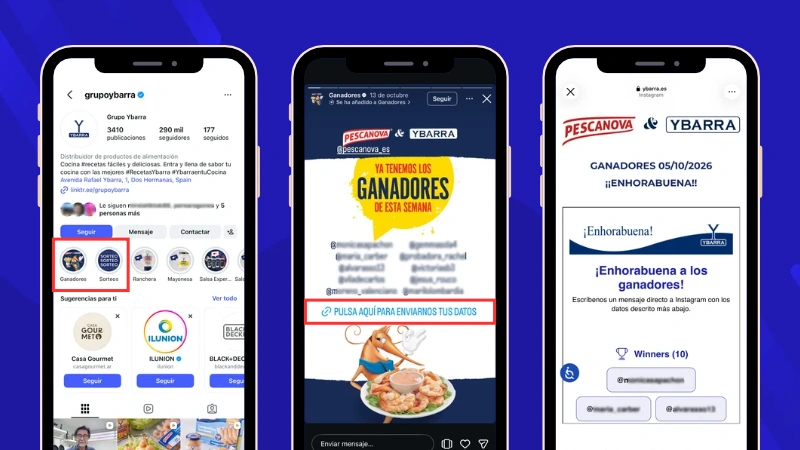
Ybarra also customizes its Easypromos Winners Pages with its corporate branding, maintaining a consistent campaign identity through the winner-announcement stage.
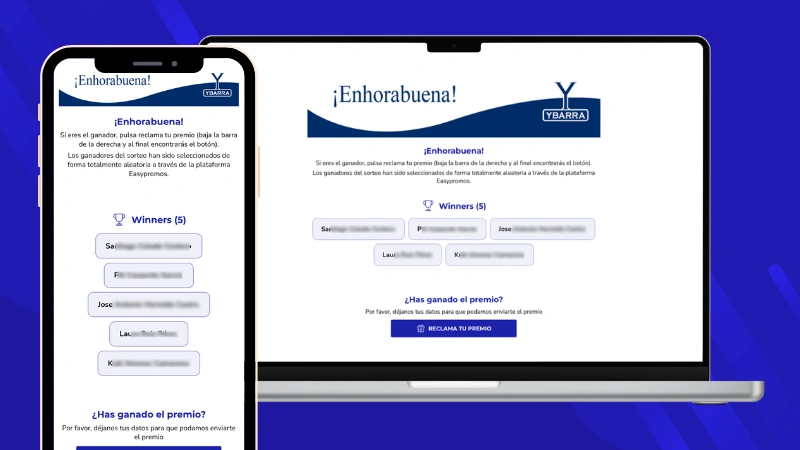
On other social networks, such as Facebook or X, you can include the link to the Winners Page directly in the giveaway post.
Assign a Specific Prize to Each Winner and Display It on the Winners Page
When a giveaway includes several different prizes, it is important that each winner can easily see which prize they have won.
With Easypromos, you can assign a specific prize to each winner and display that information on the public Winners Page. The prize appears alongside the name of each winner.
For example, Candy Corner, a candy store, ran an Instagram giveaway with five winners, each receiving a different prize. With Easypromos, the brand randomly selected the winners from the users who commented on the post and assigned a specific prize to each person.
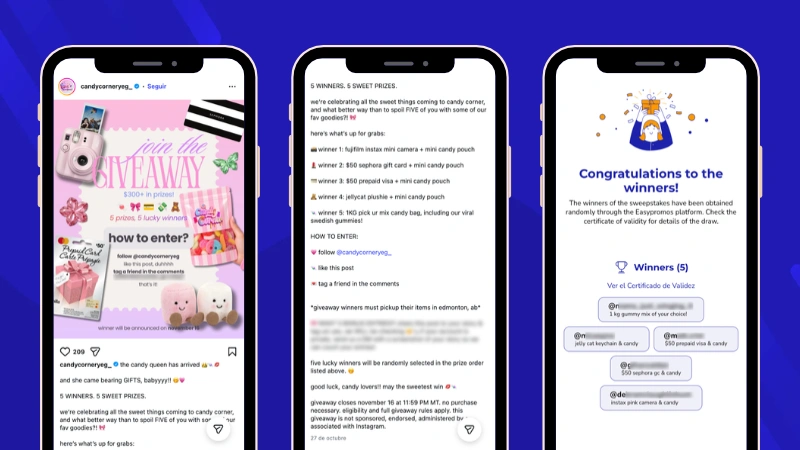
The information was also displayed on the public Winners Page, where participants could see each winner together with the prize they had received.
This is especially useful for giveaways with several prize types, as it keeps all the results clear and organized and helps avoid confusion among participants.
Announce the Winners With a Countdown Video
Another way to announce the winners is with a customized countdown video that reveals their names. This format builds anticipation before the results are shown and turns the announcement into engaging content that can be shared on social media.
In Easypromos, this feature is called Show Mode. It creates an animated presentation with a countdown and reveals the winners and alternates using visual and sound effects. The video is generated automatically from the giveaway results, so there is no need to create the animation manually or use external video-editing software.
Below, you can see several examples of how to announce giveaway winners using a countdown video that builds anticipation before revealing the results.
The video can be used to announce a single winner, reveal several winners, or present the results during a live broadcast.
Customize the Video With Your Brand Identity
The winner video can be adapted to match the campaign design and maintain a consistent visual identity across all communications.
With Easypromos, you can customize the colors, text, fonts, and images used in the presentation. You can also add logos, prize images, and visual elements from giveaway sponsors or partners.
This keeps the winner announcement consistent with the brand identity used throughout the campaign.
Countdown video customization options are available from the Basic PRO plan onward.
Share the Video on Social Media or Through a Link
Once the countdown video has been generated, you can share it in several ways. Easypromos provides a URL that lets viewers open the presentation directly in a browser.
With Basic PRO plans or higher, you can also download the video in WebM or MP4 format and share it through your own communication channels.
The countdown video is available in both horizontal and vertical formats. The vertical version works well for Instagram Stories and Reels, while the horizontal version can be used in posts, presentations, or live broadcasts.
In the following example, a brand celebrated Friendship Day with its community by running an Instagram giveaway. To announce the winners, it shared a countdown video in Instagram Stories, building anticipation before revealing the names.
If you want to explore all the options, see our tutorial on how to customize and export Show Mode for a giveaway.
Save Your Designs as Templates
Easypromos lets you save the design of your countdown video, Winners Page, and Claim Your Prize setup as templates.
These templates allow you to reuse the same visual identity in future giveaways from the same brand, so you do not need to customize each page again from scratch.
Read more about using templates when publishing your giveaway winners.
Share the Giveaway Certificate of Validity
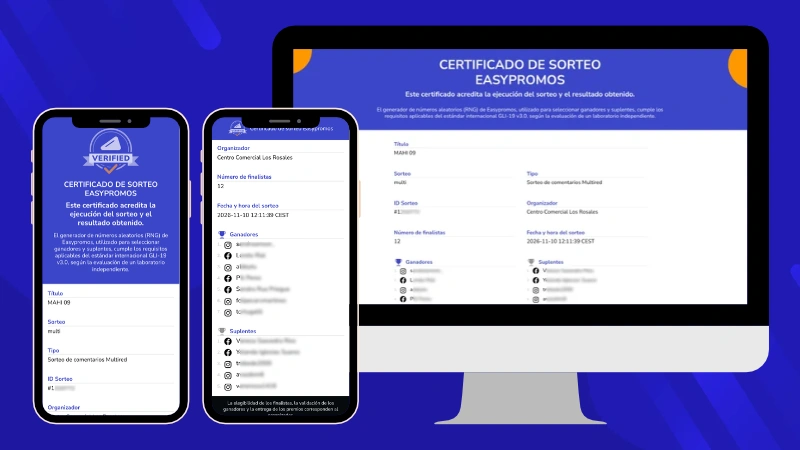
In addition to announcing who won, it is important to show that the winners were selected randomly and transparently. Easypromos automatically generates a Certificate of Validity that documents the giveaway and its results.
The certificate identifies the giveaway and records the random selection of winners and alternates. Once the giveaway has been completed, the certificate cannot be modified.
It has its own public URL, which you can share on social media or include on the Winners Page. This gives participants access to a documented record of the results and an additional way to verify how the winners were selected.
Sharing the Certificate of Validity is particularly useful for giveaways with thousands of comments, campaigns run by large brands, or promotions with high-value prizes, where transparency is especially important.
View the Results of Multiple Giveaways Run From the Same Post
Some brands run several consecutive giveaways using the same Instagram or Facebook post. With Easypromos, you can run each drawing separately using the participants from the original post and decide whether previous winners should be excluded from subsequent selections.
All the drawings carried out from the same post are grouped within the same Certificate of Validity.
Participants can use a dropdown menu to view the results of each individual drawing, including the winners and alternates selected in each one.
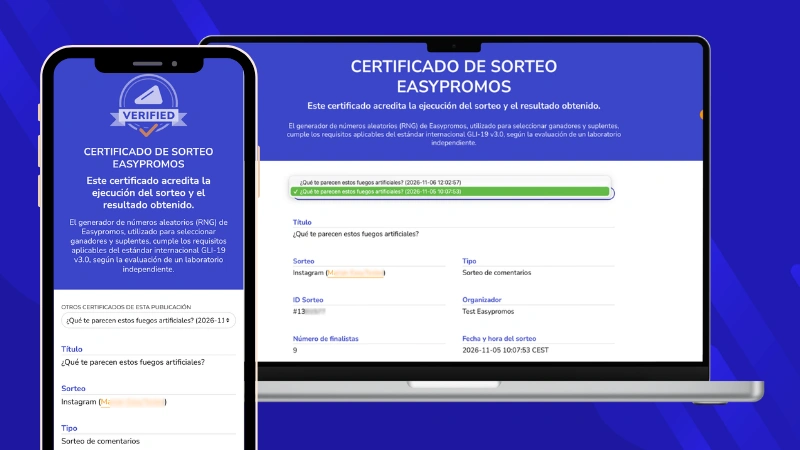
This is particularly useful for Instagram giveaway marathons, where a brand may announce several groups of winners throughout the same day while maintaining a clear record of every selection.
Examples of How to Announce Winners on Instagram, Facebook, and X
Not every giveaway needs to announce its results in the same way. The best format depends on the number of winners, the channels used, and how much visibility you want to give the announcement.
Here are some examples of how to communicate the results depending on the type of giveaway.
Announce Giveaway Winners in Instagram Stories
A simple option is to publish a Story announcing that the giveaway has ended and add a link to the Winners Page using the link sticker.
To make the results easier to find later, you can save the Stories to a Highlight on your profile, for example under Winners or Giveaways.
Below are two examples from Asevi, a Spanish home care brand, and Baseus Spain, the Spanish account of the consumer electronics brand Baseus. Both use Instagram Story Highlights to keep giveaway and winner announcements accessible after the Stories themselves have expired.
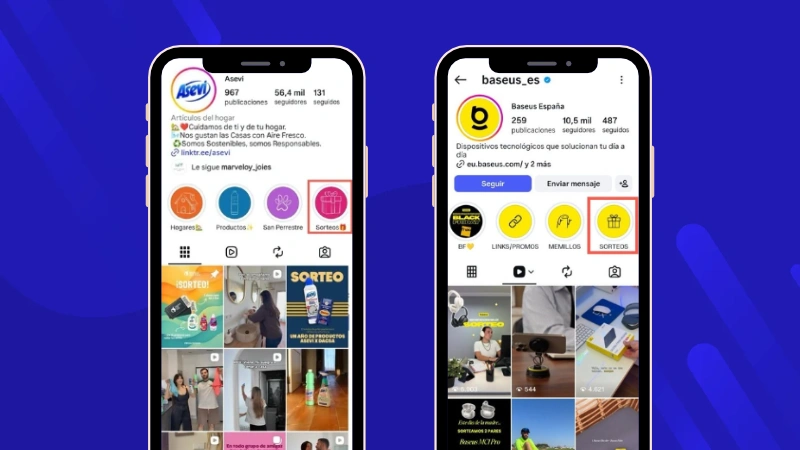
You can also publish an image showing the winners’ names and mention their profiles where appropriate and permitted by the giveaway rules. However, we recommend complementing this with a public Winners Page so participants do not have to rely exclusively on a temporary Story, which lasts 24 hours by default or up to 48 hours with Instagram Plus using the Story Extend feature.
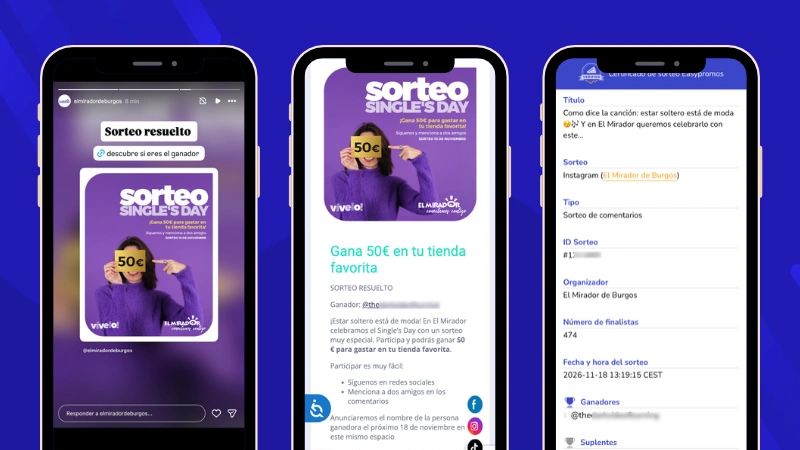
For example, Mirador de Burgos, a shopping center in Spain, announced its giveaway winners through an Instagram Story with a link to its own results page, where participants could see the winners and access the Easypromos Certificate of Validity.
Publish a Winner Announcement Video on Instagram or Facebook
When you want to give the winner announcement more visibility, you can use a countdown video.
This format works particularly well when the giveaway includes a major prize, when you want to build anticipation, or when the results are announced during a live broadcast.
For example, Jamar, a furniture retailer, used Easypromos Show Mode to announce the winners of several car giveaways organized for its 75th anniversary.
The brand incorporated the countdown video into its Instagram Live broadcasts, turning the winner reveal into one of the main moments of the campaign.
Learn more about this use case in our article on how to present giveaway results during a live broadcast.
Announce Winners From an Instagram Giveaway Marathon
When a brand runs several giveaways over the course of a day or campaign, participants need an easy way to identify the results from each selection.
The brand can announce each result through a Story or countdown video and direct participants to the public Winners Page.
This allows users to check both the latest winners and the results of previous drawings without searching through multiple social media posts. The Certificate of Validity also provides access to the different selections made from the same giveaway post.
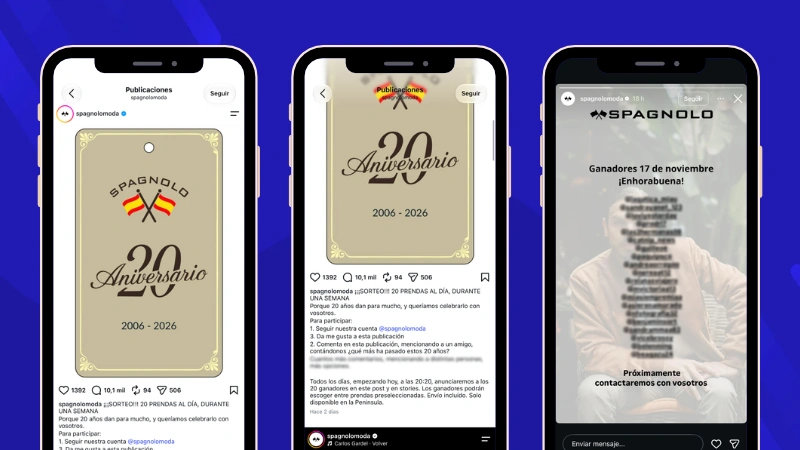
For example, Spagnolo, a Spanish clothing brand, celebrated its 20th anniversary with a week-long giveaway marathon, awarding 20 items of clothing every day.
The brand used Instagram Stories to announce the 20 daily winners and keep participants updated throughout the campaign.
Share Winners and the Certificate of Validity on Facebook or X
On Facebook and X, you can announce the winners in a post that includes their names, a campaign image, and links to the Winners Page and Certificate of Validity.
A clear winner announcement can also include the prize, the date of the drawing, and the URL where participants can check the results.
For example, dm baby Romania, the baby product line of the dm drugstore chain, ran a Facebook giveaway featuring baby food products.
After the giveaway ended, the brand updated the original post to congratulate the winners and added a direct link to the Easypromos Winners Page, where participants could check the results.
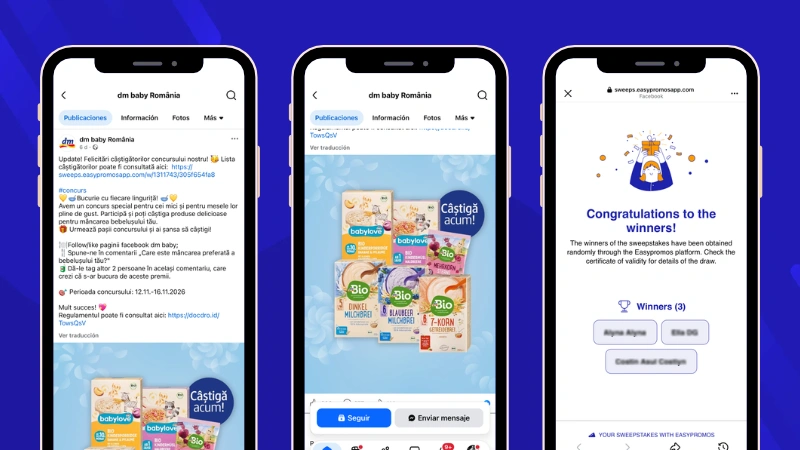
This approach is particularly useful when you want the results to remain easy to verify and accessible after the giveaway has ended.
What to Do After Announcing the Winners
Publishing the results is an important step, but it does not mean the giveaway management process is finished.
Once the winners have been announced, you still need to contact them, verify that they meet the eligibility requirements established in the giveaway rules, and collect the information needed to deliver the prizes.
For giveaways with multiple winners, this process can be simplified with Easypromos Claim Your Prize, which lets you manage winner confirmation and collect the information required for prize delivery in a structured way.
Read our guide on how to contact giveaway winners and manage prize delivery, including winner verification and what to do when a selected winner does not respond.
Giveaway Winner Announcement FAQs
The way you communicate the results should follow the giveaway rules and any applicable regulations. We recommend announcing the winners on the same social network where the giveaway was held, as this is where participants are most likely to look for the results. You can also use a public Winners Page and share the link across different channels, as long as this is consistent with what was stated in the giveaway rules.
You can publish a Story with a link to the Winners Page, share a Reel with a countdown video, create a new post, or update the caption of the original giveaway post. Make it clear that the giveaway has ended and provide an easy way for participants to check the results.
Use a Winners Page with a public URL and share it through your social media profiles. On Instagram, you can also save the winner announcement to a Story Highlight or publish the results in a post or Reel that remains on your profile. This prevents a temporary Story from being the only place where participants can find the results.
Yes. With Easypromos, you can access the results of previous giveaways and share their public Winners Pages, subject to the service availability conditions. When several drawings are run from the same Instagram or Facebook post, participants can also use a dropdown menu to view the different winner selections.
Easypromos keeps giveaway participant data for 3 months and then deletes it.
Winner and alternate data is retained for a minimum of 90 days after the giveaway ends to support prize management and Certificate of Validity requirements. After this period, the organizer can manually delete the data according to their own privacy and data-protection policies. If it is not deleted manually, Easypromos automatically removes it after 5 years.
When you run a giveaway with Easypromos, a Certificate of Validity is generated automatically with its own public URL. You can share this link directly on social media or include it on the Winners Page. To keep the certificate displaying the giveaway results, an active Easypromos plan is required. Public availability depends on the service conditions and the type of giveaway.
Yes. Easypromos Show Mode can create an animated presentation with several winners, up to a maximum of 10. This allows you to reveal several winners in a single countdown video instead of creating a separate post for each one.
Publishing the names communicates the result, but we recommend also providing information that makes the outcome easy to check and verify. For example, you can share a public Winners Page together with the giveaway’s Certificate of Validity. This gives participants a clear place to check the results and adds transparency to the winner-selection process.
The Winners Page and Certificate of Validity remain published while you have an active Easypromos plan. If the subscription is not renewed, the links will stop displaying the giveaway results. Visitors will instead see a message indicating that the information is no longer available.
Announce Your Giveaway Winners With Easypromos
As you can see, Easypromos helps you manage giveaway winner selection and combine different resources to announce the results on Instagram, Facebook, and X in a professional and transparent way.
Create your Easypromos account to select your giveaway winners and publish the results clearly and transparently.