The best format depends on what you want to achieve. Native Instagram polls are useful for quick interaction, while surveys and voting experiences hosted on an Easypromos microsite can collect more detailed responses, capture participant data, and include prizes or giveaways.
In this article, we’ll explain how to create Instagram surveys and polls, when to use each format, and how to combine Instagram with Easypromos to collect responses, engage your audience, and reward participation.
How to Create an Instagram Survey or Poll Step by Step
Before choosing a format, be clear about what you want to learn from your audience and how you plan to collect the responses. The right setup will depend on whether you need a quick opinion, more detailed feedback, participant data, or a way to reward participation.
- Define the goal of your survey or poll
Start by deciding what you want to achieve. You might want to understand your followers’ preferences, validate a new product idea, generate interaction, collect feedback, or capture new leads. A clear goal will help you choose the right format and determine what information you actually need from participants.
- Choose the right format
For quick opinions, a native Instagram Story poll or a comment-based vote may be enough. If you want to collect more detailed answers, participant data, or multiple responses, use Instagram to direct users to a dedicated survey or voting experience hosted on an Easypromos microsite.
We’ll look at the different options in more detail below. - Set up the survey or poll
For native Instagram polls, create the interaction directly in Stories, comments, or messages. For more complete surveys and voting experiences, Easypromos lets you customize the questions and design, add a registration form, define participation dates and rules, and configure thank-you messages or prizes.
- Promote it on Instagram
Make the participation route clear. Depending on the format, users might answer directly on Instagram or access the survey through a link in your bio, a Story link, or an Instagram Messaging Automation that sends them to the promotion microsite. You can also support the campaign with organic posts, paid promotion, email, or QR codes when the audience also interacts with your brand offline.
- Analyze the results
Once the campaign is running, review the responses to identify preferences, recurring answers, and other useful insights. With Easypromos, you can analyze participation data and export results for further analysis or follow-up.
- Reward participation, if relevant
Adding a prize can give users an extra reason to take part. Depending on the campaign, you can award prizes directly or run a random giveaway among eligible participants once the survey or poll has ended.
How to Run Surveys and Polls on Instagram
Instagram can be used both as the place where people answer a poll and as the channel that directs them to a more complete survey or voting experience. The right approach depends on how much information you want to collect and how you want users to participate.
1. Create a poll using Instagram comments and hashtags
One simple way to poll your audience is to ask users to vote in the comments. You can assign a different hashtag to each option and invite participants to comment with the hashtag that represents their choice.
This format lets you identify audience preferences while keeping participation entirely within Instagram. If you also want to reward participants, you can run separate giveaways among the users who selected each option.
Carné Joven Aragón: combine an Instagram poll with multiple ticket giveaways
Carné Joven Aragón, a youth benefits program in Spain, used a single Instagram post to give away tickets to several concerts at a music festival.
Participants indicated which concert they wanted to attend by commenting with the corresponding hashtag and mentioning the person they would take with them.
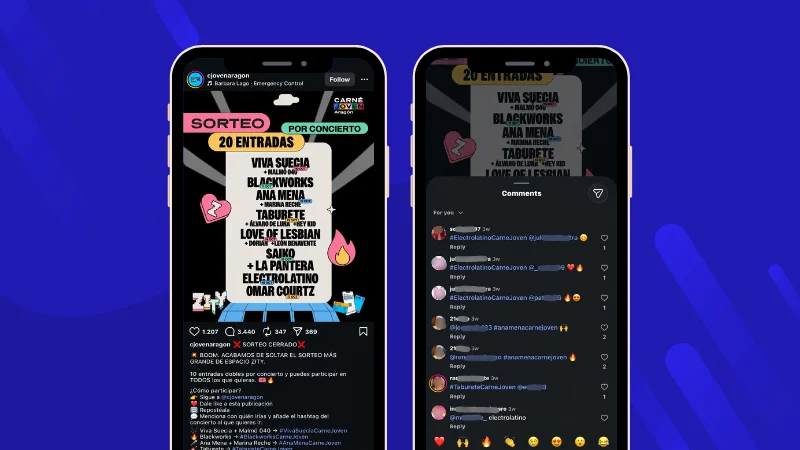
Each concert had its own hashtag, making it possible to see which options attracted the most interest and select winners separately for each concert from the same post.
With Easypromos Instagram Giveaway, you can filter comments by hashtag and run a separate random winner selection for each option without creating multiple giveaway posts.
2. Ask questions through Instagram Stories and messages
Instagram Stories can also be used to ask open-ended questions and invite followers to respond by message. This gives participants more freedom than a standard poll with predefined options and can be useful when you want to collect opinions, ideas, or preferences directly within Instagram.
You can ask a single question or publish several Stories around the same topic, then use the responses to better understand your audience. If you want to encourage participation, you can also turn the interaction into a giveaway.

With Easypromos Instagram Story Giveaway, you can automatically import Story replies and randomly select winners among eligible participants. Responses can also be filtered by hashtag when the campaign requires users to include a specific hashtag in their message.
3. Create a survey or interactive poll and promote it on Instagram
For more complete surveys and voting experiences, Instagram can be used to drive followers to an Easypromos microsite where the actual interaction takes place.
This approach gives you more flexibility than a native Instagram poll. You can ask multiple questions, present visual options, collect participant data through a registration form, and reward users with direct prizes, discount codes, or a giveaway.
You can promote the experience on Instagram through a link in your bio or Stories, or use Instagram Messaging Automations to send the microsite link automatically when someone comments with a keyword or sends a relevant message.
Depending on your goal, you can choose different formats for the experience:
Survey
Use a Survey when you want to collect more detailed feedback than a simple poll can provide. You can combine different question types to learn about your audience’s preferences, habits, opinions, or experience with your brand and products.
Because the survey is hosted on an Easypromos microsite, you can also add a registration form to collect participant data and connect responses with individual users.
If you want to encourage participation, you can reward respondents with a direct prize or enter them into a random giveaway once they complete the survey.
Brisa Festival and MINI Automotor: collect event feedback and reward participants
Brisa Festival, a music festival in Málaga, Spain, partnered with MINI Automotor, a local MINI dealership, on Brisa en tu Barrio, an initiative showcasing emerging local bands through free concerts across the city.
After attending the performances, visitors could scan a QR code at the MINI Stage and answer one simple but valuable question: Which Brisa en tu Barrio performance was your favorite?
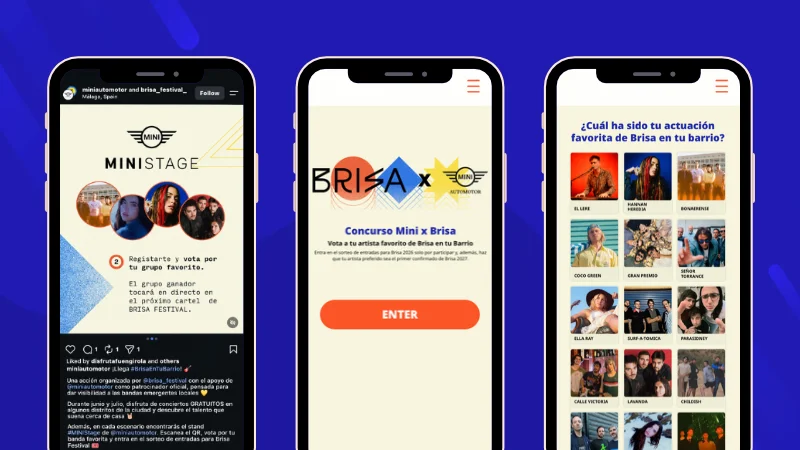
Participants registered their response on the campaign microsite and were entered into a giveaway for tickets to Brisa Festival. The campaign was also promoted on Instagram, helping extend the reach of the activation beyond the physical event.
This shows that a survey does not need to be long to generate useful insights. A single, well-chosen question can help a brand understand audience preferences while the registration form and prize incentive encourage participation.
Pick Your Favorite
Use Pick Your Favorite when you want participants to choose one option from several candidates presented on the same screen. It works well for product preferences, creative concepts, performers, experiences, or any campaign where you want to identify the most popular option.
Because the vote takes place on an Easypromos microsite, you can combine it with a registration form, collect participant data, and reward users after they vote.
Grunge Lives Here: let followers choose the opening band
Grunge Lives Here, a live music event in Miami, used Pick Your Favorite to let its audience choose which of four Florida bands would open for TRULY, featuring Hiro Yamamoto, founding member of Soundgarden.
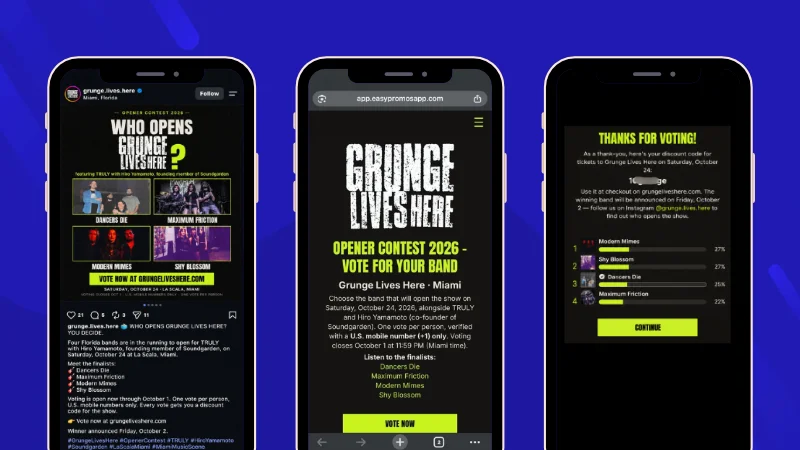
The campaign was promoted on Instagram, while voting took place on the campaign microsite. Participants registered and voted for their favorite band, and every voter received a discount code for tickets to the show.
This is a good example of how Instagram can generate visibility for a poll while the microsite handles the actual voting, registration, and reward.
Like or Not
Use Like or Not when you want participants to quickly rate a series of images or options. Users swipe right or left to indicate whether they like each one, making the experience particularly useful for testing products, designs, concepts, or other visual content.

Once participants complete the experience, they can see how their preferences compare with those of the wider audience through an aggregated ranking.
Because the interaction takes place on an Easypromos microsite, you can also add a registration form to collect participant data and use Instagram to drive users to the experience through a bio or Story link, or Instagram Messaging Automations.
Face Off
Use Face Off when you want participants to choose between options presented two at a time. After each choice, the selected option faces a new alternative until the participant reaches their final favorite.
This format works well when you want to make preference testing more interactive, whether participants are comparing products, experiences, destinations, activities, or other campaign options.
Because the experience takes place on an Easypromos microsite, Instagram can be used to promote it and guide interested users to participate through a link in the bio or Stories, or by sending the link through Instagram messages.
SIGAUS: turn choosing a favorite summer plan into an interactive promotion
SIGAUS, a Spanish organization responsible for managing used industrial oil, promoted its Tu Planazo de Verano campaign on Instagram and invited followers to choose their preferred summer plan through the campaign microsite.
Users could access the experience through the link in the brand’s bio or Stories, or request the link by private message.
Participants had the chance to win a Nintendo Switch 2, while taking part also unlocked cinema tickets as a direct reward.
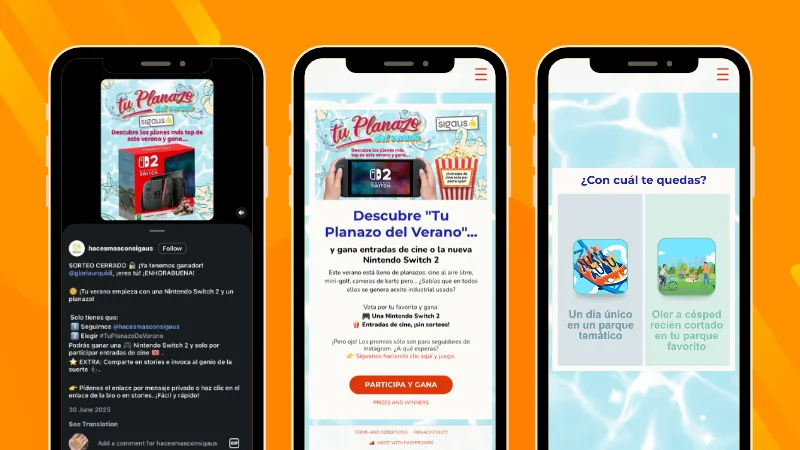
The campaign shows how Face Off can turn a simple preference question into a more interactive experience, while Instagram provides several routes for directing followers to the microsite where the choices and participation are registered.
4. Use Instagram’s native Story polls
For quick feedback, Instagram’s built-in Story poll is the simplest option. You can ask a short question, present predefined answers, and let followers respond without leaving Instagram.
This format works well when you want an immediate reaction or a simple preference, such as choosing between two products, ideas, designs, or experiences.
Its main limitation is that the interaction stays entirely within Instagram. You do not collect participant data through a registration form, and the format is less suitable when you need more detailed responses, multiple questions, or a structured reward mechanic.
For those goals, a dedicated survey or voting experience hosted on an Easypromos microsite gives you more control over the questions, participation data, and incentives.

Instagram Surveys and Polls FAQs
An Instagram poll usually asks a quick question with a limited number of options and is designed for fast interaction. A survey can collect more detailed feedback, include several question types, and gather participant data through a registration form.
Instagram includes native tools such as Story polls and questions, which are useful for simple interactions. For more complete surveys, you can use Instagram to direct followers to an Easypromos microsite where they answer the questions and register their participation.
You can share the survey through a link in your bio or Stories, or use Instagram Messaging Automations to send the microsite link when someone comments with a keyword or sends a relevant message. You can also promote the campaign through organic posts, paid content, email, or QR codes when the survey is connected to an in-person activation.
Yes. When the survey is hosted on an Easypromos microsite, you can add a registration form and collect the participant data you need, subject to the terms and consent requirements of your campaign.
Yes. Depending on the format, you can give participants a direct prize, discount code, or entry into a random giveaway. For example, Grunge Lives Here gave every registered voter a discount code for its show, while Brisa Festival entered survey participants into a ticket giveaway.
You can combine Instagram with several Easypromos formats, including Survey, Pick Your Favorite, Like or Not, and Face Off. Instagram is used to promote the experience and direct users to the microsite where responses, votes, and registrations are collected. You can also run simpler interactions directly on Instagram through comments, hashtags, Story replies, and native Story polls.
Choose the Right Instagram Survey or Poll for Your Goal
There is no single way to ask your audience for feedback on Instagram. A native Story poll may be enough for a quick preference, while comments and messages can support simple interactions directly on the platform.
When you need more detailed responses, participant data, or a more interactive voting experience, Instagram can also act as the channel that directs users to an Easypromos microsite.
With Easypromos, we can create surveys, polls, voting experiences, and reward mechanics that complement Instagram and help turn audience feedback into useful data and measurable participation.
Want to create your own Instagram survey or poll? Request a video call and we’ll help you choose the right format for your campaign.