When children are involved, however, the participation flow needs some additional planning. You need to decide who will complete the registration form, what information you actually need to collect, how to handle participation by minors, and whether entries should be moderated before they are published.
With Easypromos, we can create drawing contests with customizable registration forms, conditional fields, moderated galleries, age categories, public voting, and different winner-selection options.
In this guide, we explain how to organize an online drawing contest for kids, from setting the participation rules and collecting the right data to managing submissions, voting, and winners.
Decide Who Completes the Registration Form
Before setting up the contest, decide whether the child will complete the registration form or whether a parent or legal guardian will submit the entry on their behalf.
Both approaches can work, but they require different form setups and different information.
When the child completes the form
If children register directly, keep the form as simple as possible and collect only the information you genuinely need for the contest.
Conditional fields can help adapt the form according to the participant’s age. For example, you can ask “Are you less than 18 years old?” and display a required field requesting the name of a parent or legal guardian only when the participant selects “Yes.”
This avoids showing unnecessary fields to adult participants while ensuring that the additional information is collected when a minor takes part.
When a parent or legal guardian registers on behalf of the child
Another option is for the adult to complete the form and submit the child’s drawing.
In this case, the form can collect the adult’s contact details and include a checkbox confirming that they are the child’s parent or legal guardian. You can then request only the child information needed to manage the contest, such as a first name, age, or age category.
Vegalsa-Eroski, a Spanish food retail company, used an Easypromos Photo Contest for its Christmas drawing competition. Employees could upload drawings created by their children or grandchildren aged 12 or under, with prizes awarded in different categories.
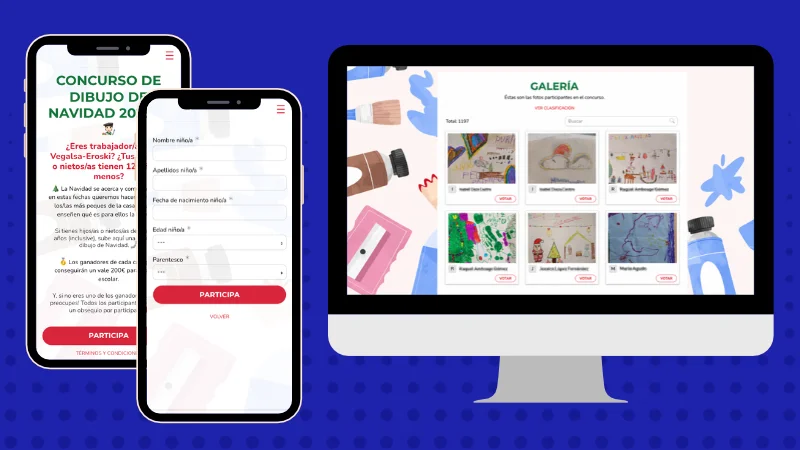
This model can be particularly useful when the organizer wants all communication, consent, and prize management to go through an adult.
Collect Only the Data You Need
When children participate in a drawing contest, the registration form should collect only the information needed to manage the promotion, identify eligible participants, communicate with the appropriate adult, and deliver the prize.
The exact fields will depend on who completes the form. If the child registers directly, you might need their name or age category together with parent or legal guardian information when applicable. If an adult submits the drawing on the child’s behalf, prioritize the adult’s contact details and collect only the child information needed for the contest.
Use conditional fields when minors can participate
Conditional fields let you adapt the form according to the participant’s answers instead of showing every possible field to everyone.
For example, if the form asks “Are you less than 18 years old?”, selecting “Yes” can automatically display a required field requesting the name of a parent or legal guardian.
The comparison below shows the difference. Without conditional fields, the legal guardian field remains visible to every participant, even when it is not relevant. With conditional fields, it appears only when the participant confirms they are under 18.
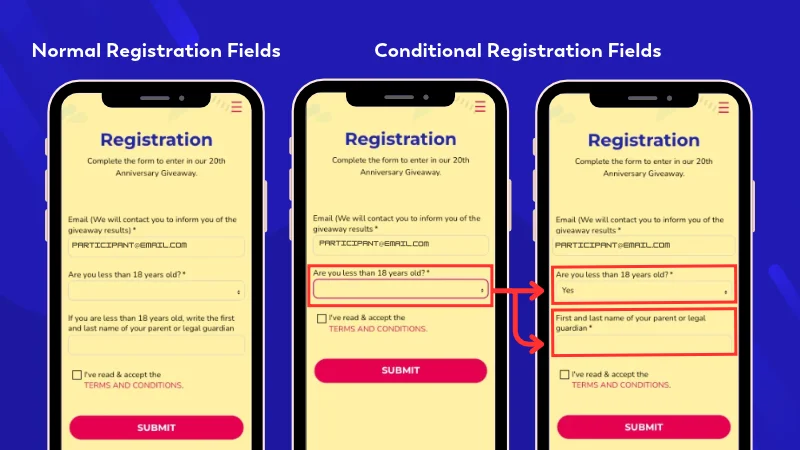
This creates a cleaner registration experience while still collecting the additional information needed when a minor participates.
Use age restrictions when participation is limited to specific ages
Conditional fields and age restrictions solve different needs.
Use conditional fields when minors are allowed to participate but the form needs to adapt according to their age. If the contest is open only to adults, you can instead ask participants to confirm that they meet the minimum-age requirement before submitting the form.
For example, a required checkbox can ask participants to confirm that they are 18 years or older. If they cannot confirm this condition, they cannot complete the registration.
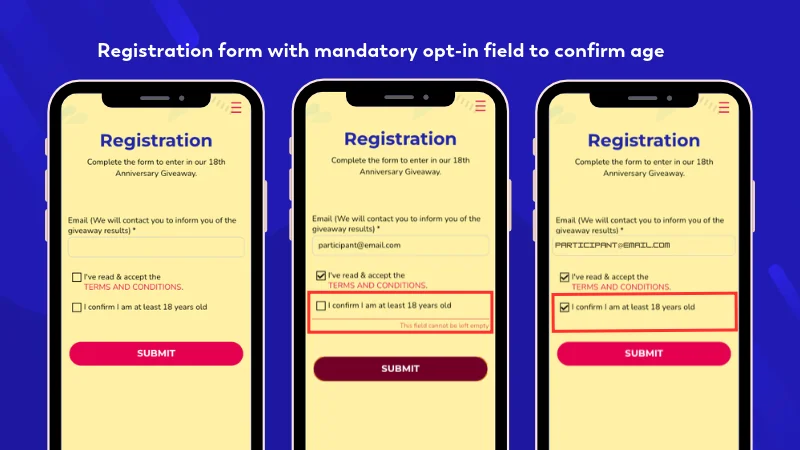
Age information can also be used to organize participants into different contest categories when the rules include separate age groups or prizes.
Define the Theme, Age Categories, and Participation Rules
A children’s drawing contest should be easy to understand from the start. Explain the theme clearly, define what participants need to create, and make the submission process as simple as possible.
If the contest includes different age groups, define those categories in advance so drawings are evaluated alongside entries from participants of a similar age. You can also assign different prizes or winner-selection criteria to each category.
Unide: keep the creative brief simple and organize entries by age
Unide, a Spanish supermarket cooperative, ran a Christmas drawing contest inviting children to show what Christmas meant to them.
The participation instructions were straightforward:
- Create a drawing about Christmas
- Take a photo of it
- Submit the image
The contest also used age categories, allowing entries to be grouped and evaluated according to the participant’s age.
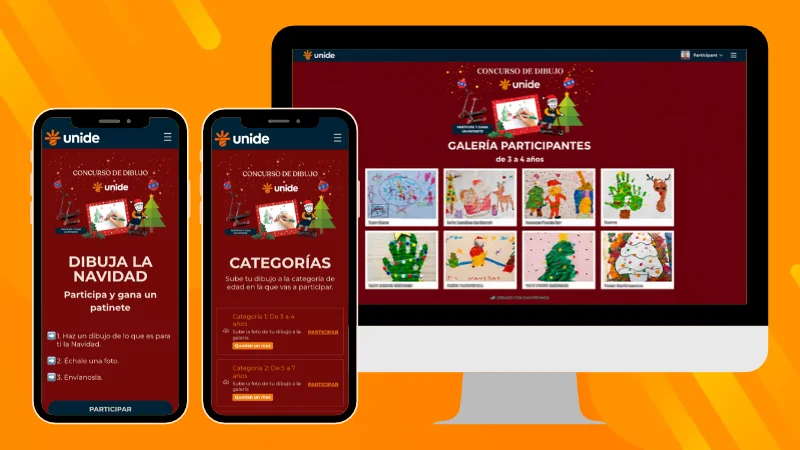
This type of structure makes the campaign easier for families to understand while giving the organizer a fairer way to compare entries across different age groups.
Whatever format you choose, the contest rules should also explain the participation dates, eligible ages, submission requirements, prizes, winner-selection process, and how the results will be communicated.
Make It Easy to Submit a Drawing
Once the artwork is ready, submitting it should require as few steps as possible.
The simplest option is to let participants upload a photo of the drawing directly through the contest registration form. This keeps the entry, participant data, and uploaded image together in one place.
If your campaign reaches families through several channels, you can also provide alternative ways to send in the artwork and then centralize the entries in the same contest gallery.
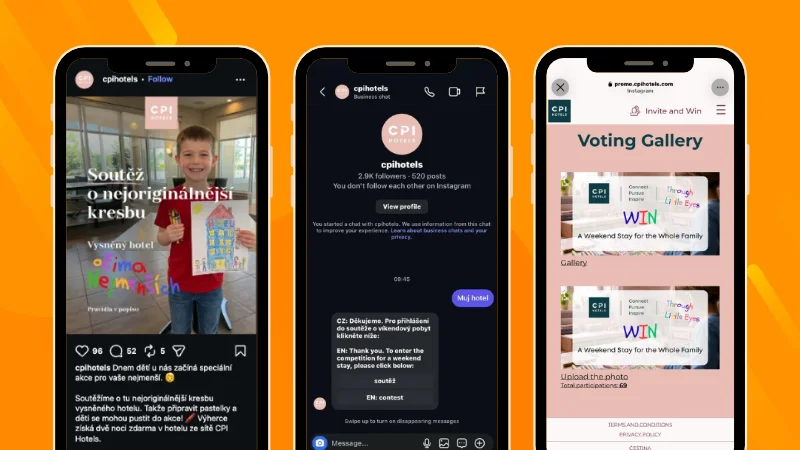
CPI Hotels, a hotel group operating across Central Europe, used an Easypromos Online Voting Contest for its children’s drawing campaign. Families could submit drawings through the campaign microsite, Instagram direct messages, or email. Entries received outside the microsite were then added to the same moderated gallery.
The key is to keep the submission process clear and consistent, regardless of the channel used.
Want to see how the full campaign worked?
Read the CPI Hotels Success Story to see how the brand combined multiple submission channels, a moderated gallery, public voting, and Instagram promotion in one children’s drawing contest.
Moderate Entries Before Publishing Them
If drawings will appear in a public gallery, review submissions before they are published.
Moderation gives you control over what appears in the contest and lets you check that each entry follows the participation rules, includes the required information, and is appropriate for publication.
With Easypromos, entries can be reviewed before they become visible in the gallery. This is particularly useful in contests involving children, where organizers may want to prevent personal information, inappropriate content, or invalid submissions from being displayed publicly.
It also gives the organizer a clear opportunity to reject entries that do not meet the contest requirements before voting begins.
Create a Public Gallery and Add Voting
A public gallery gives families a place to see the submitted drawings and can turn the contest into a more interactive experience.
You can display approved entries in a gallery and allow visitors to vote for their favorites. Depending on the campaign, voting can determine the final winner or simply help create a shortlist for a jury.
If you use voting, explain clearly how it affects the final result. For example, the most-voted entries can advance to a final stage, while a jury makes the final decision.
With Easypromos, we can configure the gallery, voting rules, number of votes allowed, voting dates, and winner-selection process according to the contest format.
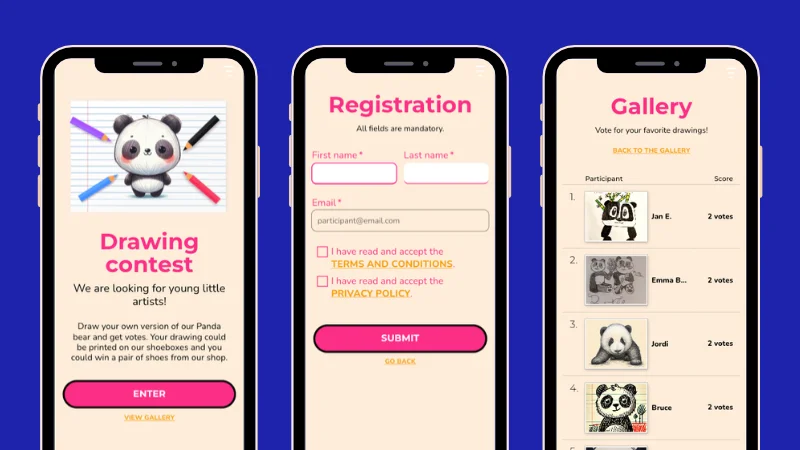
Try the Drawing Contest demo and see how image submissions, a public gallery, and voting work in a children’s drawing contest.
Choose Winners Transparently
Decide how winners will be selected before the contest begins and explain the process in the official rules.
Depending on the campaign, you can:
- let public voting determine the winner;
- use voting to create a shortlist and have a jury make the final decision;
- select winners separately within different age categories;
- choose a winner randomly from eligible entries.
For children’s drawing contests, age categories can be particularly useful when participants of very different ages are taking part.
Whatever method you choose, make the criteria, dates, and number of winners clear from the start so families understand how the final result will be determined.
Choose a Prize That Fits the Contest
The prize should match the age of the participants and the effort required to enter.
For a drawing contest, good options include school supplies, creative materials, family experiences, products from your brand, or prizes related to the contest theme.
You can also reward more than just the overall winner. For example, Vegalsa-Eroski, a Spanish food retail company, awarded a €200 school-supplies voucher to the winner of each category and gave every participant a small gift.
Whatever prize you choose, explain clearly what is included, how many prizes are available, and whether they are awarded by age category, public vote, jury decision, or random selection.
Promote the Contest Across Multiple Channels
A drawing contest should be easy to discover wherever your audience already interacts with your brand. Promote the campaign across relevant channels and direct participants to the same contest microsite.
Zen Elite Equestrian Center, a U.S. dressage training center, promoted its 2027 Shining Star Grant program through Instagram, Facebook, and its website. Each channel directed riders to the same campaign page, where they could learn more and submit their application.

Using one central participation destination makes the campaign easier to manage while allowing different channels to contribute traffic and visibility.
Decide How You Will Use the Submitted Artwork
A drawing contest can continue generating value after the winner is announced. Selected artwork might be featured on your website, social media channels, campaign materials, or even incorporated into a product or packaging.
If you plan to reuse participants’ drawings beyond the contest itself, explain this clearly in the participation rules and make sure you obtain the appropriate permissions, especially when the artwork has been created by a minor.
Being clear from the beginning helps families understand where submitted drawings may appear and how the brand intends to use them.
Create a Drawing Contest That Is Easy for Families to Join
A successful children’s drawing contest combines a simple creative challenge with a participation flow that works for both families and organizers.
With Easypromos, we can collect entries and participant data, adapt registration forms with conditional fields, organize submissions by age category, moderate content, publish galleries, enable voting, and manage winner selection from one platform.
Create your Easypromos account and start building your online drawing contest.