Key Takeaways
- Automating Instagram messages allows brands to respond and start conversations in DMs without constant manual management.
- You can use Instagram’s basic features (welcome messages, away messages, quick replies) or more advanced automations through integration with the official API.
- Automations are triggered by real user interactions: keywords in comments, Story replies, mentions, or Direct Messages.
- Automation turns DMs into a structured channel to capture leads, deliver resources, and activate promotions.
- When implemented well, it reduces operational workload and improves the user experience without losing control or consistency in communication.
More and more conversations between brands and users now happen in Instagram Direct Messages. When a post or Story generates a large number of chats, replying manually to every message can quickly become difficult. That is why many brands are starting to automate their responses in Instagram DMs.
What Does It Mean to Automate Instagram Messages?
Automating Instagram messages means configuring automatic responses that are triggered when a user interacts with a professional Instagram account. These interactions can include commenting on a post, replying to a Story, mentioning an account, or sending a Direct Message. When that interaction occurs, the system detects the action and automatically sends a previously configured private message.
In this way, Direct Messages stop being only a manual response channel and become a space where brands can start structured conversations with users. This makes it possible to respond instantly when many interactions occur and to turn common interactions, such as a comment or a Story reaction, into opportunities for conversation, engagement, or participation.
In practice, automating Instagram messages involves three steps: defining which interaction will trigger the conversation, configuring the message flow the user will receive, and using a tool connected to the official Instagram API to manage and measure those conversations.
Can Instagram DMs Be Automated?
Yes. It is possible to automate the sending of private messages. The DM channel was originally created as a simple private communication space where brands managed all messages manually. However, as the use of DMs has grown, Meta has introduced ways to automate these messages. This can be done through Meta Business Suite and, more importantly, and, most importantly, through access to the API with Instagram Login, which allows external platforms such as Easypromos to create more advanced automations.
What interactions can trigger automation on Instagram?
Automations on Instagram are triggered when a user performs a specific interaction with a brand’s content. These interactions act as triggers that automatically start a conversation in Direct Messages.
Below are the most common interactions that can activate an automation.
Comments on posts or Reels
The strategy of moving from comments to Direct Messages on Instagram (Comment to DM) consists of automatically triggering a private conversation when followers use a keyword in a post or Reel. In this way, a public interaction becomes a personalized conversation inside DMs, making it easier to structure the dialogue and guide the user toward a specific action.
Without a defined strategy and a tool that allows you to automate the process, this dynamic can quickly become an operational burden. Teams need to review comments, manually identify keywords, send messages one by one, and monitor interactions around the clock. Without automation, the workload becomes constant and time-consuming.
The key advantages of this strategy are:
- Moving public interaction to a private channel, strengthening the relationship with the user and allowing more personalized content
- Faster conversion by responding almost instantly with relevant information or resources
- Reduced manual work thanks to a fully automated process
- Greater reach on your Instagram account, since comments increase the visibility of the post
Story Replies
Replies to Stories are another interaction that can trigger automations in Direct Messages. When a user replies to a Story, the conversation already opens inside the DM channel, making it possible to automatically send a follow-up message with additional information, a link, or access to a specific resource.
This feature is especially useful when Stories are used to generate direct interaction with the audience: quick questions, limited-time promotions, content announcements, or calls to action inviting users to request more information. Automation makes it possible to respond immediately to each person who interacts, without manually reviewing every reply.
The advantages of this type of automation are clear:
- More opportunities to start conversations from one of Instagram’s most interactive formats
- Immediate responses to interested users
- Reduced operational workload when a Story generates many replies
Story Mentions
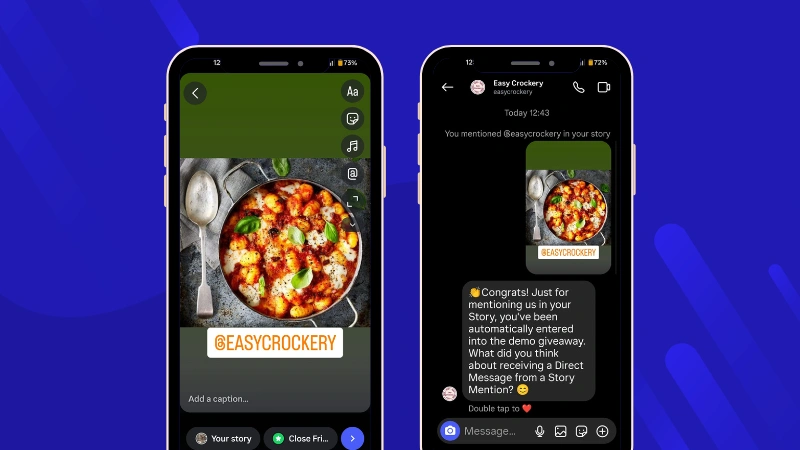
Story mentions can also be used as a trigger to start an automated conversation in Direct Messages. When a user with a public profile mentions a brand in a Story, the automation can detect that interaction and send a DM.
This type of trigger is often used in engagement mechanics or participatory campaigns where users are invited to mention the brand’s account in a Story to access exclusive content or confirm their participation in a giveaway.
Automating this process allows you to:
- Quickly recognize user mentions
- Thank users for the interaction or confirm their participation in a campaign
- Reward them directly with exclusive content or a prize
- Maintain a closer relationship with users who generate UGC about the brand
Incoming Direct Messages
Automations can also be triggered when a user starts a conversation directly in private messages. In this case, the tool detects the incoming message or a specific keyword and automatically sends a previously configured response.
This type of automation is especially useful for managing frequently asked questions or providing quick access to specific information. For example, a user can type a keyword in the chat to automatically receive a link, a document, or more details about a product or promotion.
The main advantages of this type of automation include:
- Automatically responding to common user questions
- Delivering information or resources immediately
- Keeping the DM channel active without constant manual intervention
What You Can Send with Automated Instagram Messages
Automations allow you to create automated message flows on Instagram, guide the conversation step by step, and offer content, links, or resources depending on each user’s journey. The types of content and actions that can be included in these automated messages include:
- Content downloads (PDFs, coupons, or resources). Messages can include direct links to downloadable resources such as catalogs, checklists, or coupons. These links can be configured as buttons, allowing you to deliver the promised content immediately after the interaction. A common use case is sending a downloadable resource after a user comments with a keyword on a post, keeping the experience inside Instagram.
- Links to external pages. Automations can also include links to external URLs, such as a landing page, an online store, or an active promotion. The link can appear directly in the message or be attached to a button, making it easier for the user to continue their journey toward a specific action.
- Question and answer flows. It is possible to design structured conversations through messages with buttons. Each click can trigger a new automated message, allowing you to create flows similar to surveys, option selection, or interest classification. In this way, users move step by step through the chat without manual intervention.
- Polls in Direct Messages. Direct Messages do not include an official poll sticker or built-in voting system. However, it is possible to simulate polls using conversational flows with messages and buttons. In practice, this works by configuring a sequence of messages inside the DM: first a question is sent with buttons representing different answer options. Each button then triggers a new message automatically, allowing the conversation to continue with additional questions or showing a final result based on the user’s choice.
Examples of Instagram DM Automations
From Comment Keyword to DM
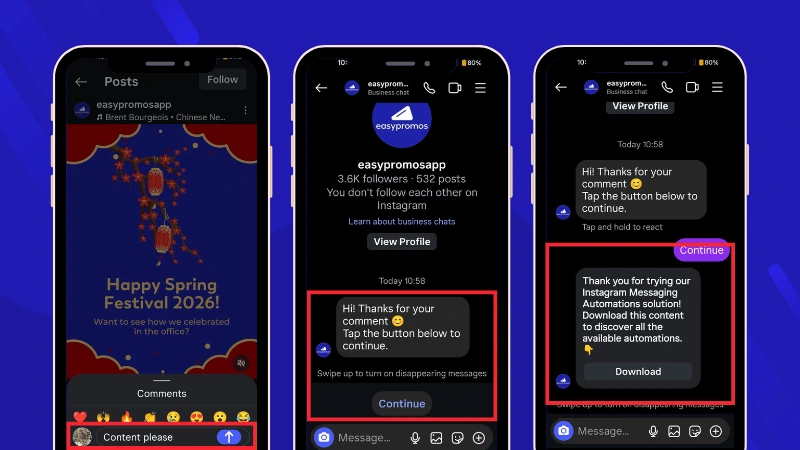
In this example, an Instagram automation is used to deliver exclusive content to users who interact with a post. When a user comments using the activation keyword “CONTENT,” a Direct Message is automatically sent requesting confirmation to continue the conversation in the private channel. After clicking the button, the user receives the content directly in the DM.
From Comment Keyword in Reel to DM
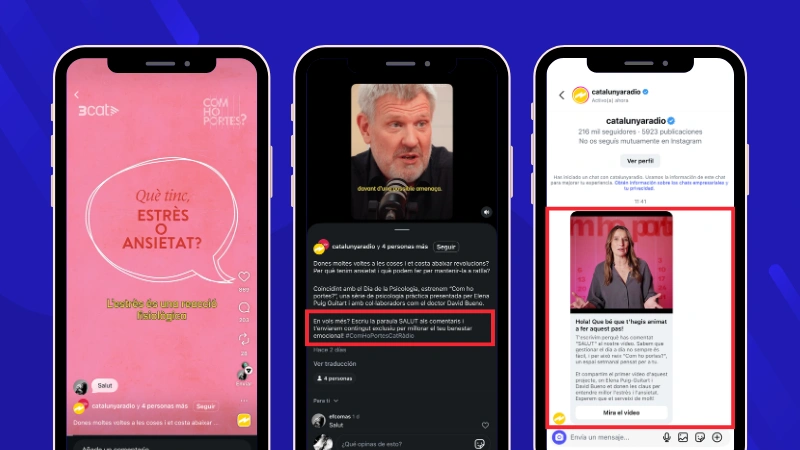
The media outlet Catalunya Ràdio launched a new program focused on health advice. To support the launch, they published a Reel featuring tips to reduce anxiety. To access the full video, users had to comment on the Reel using the activation keyword “SALUT.” Once they did, they automatically received a Direct Message with access to the complete content.
Keyword in Direct Messages (DMs)
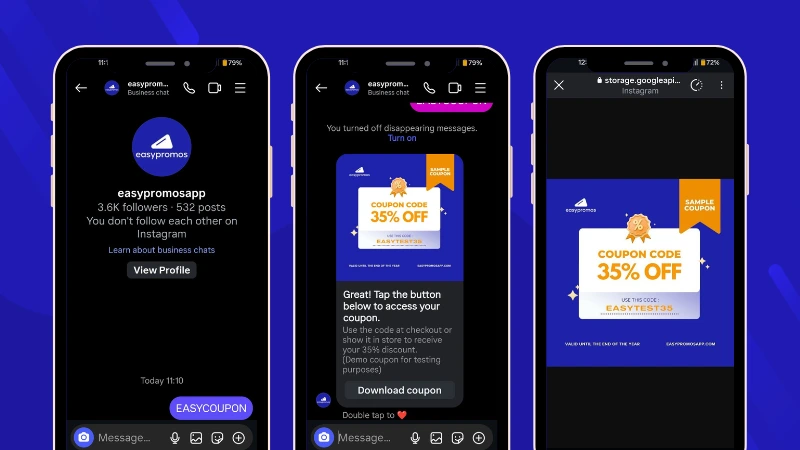
Another way to automate DMs is by triggering the conversation when a user sends a specific keyword directly in the Direct Message channel. For example, if a user sends the activation keyword “EASYCOUPON,” the automation detects the term and automatically replies with a message that includes a downloadable coupon.
Story Reply Keyword to DM
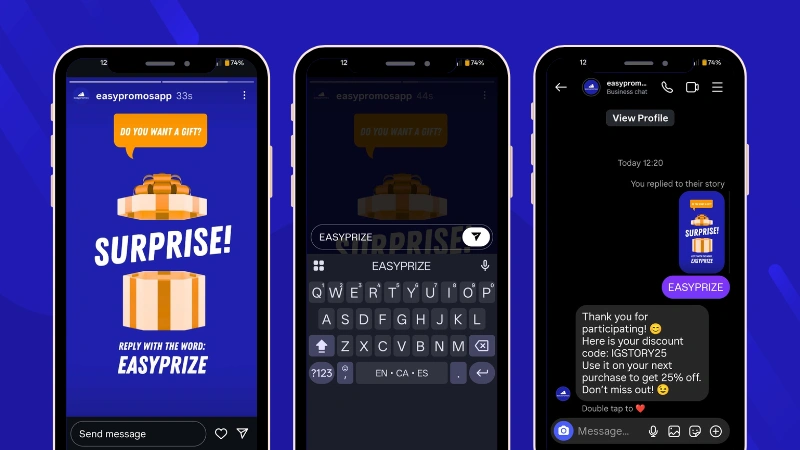
In this example, a brand uses Instagram Stories to invite users to win a discount code. Interested users reply to the Story with the activation keyword “EASYPRIZE.” Once they do, they automatically receive a Direct Message containing their discount code.
Story Mention to DM
A public mention from another account can also automatically trigger a private message, without requiring any activation keyword. In this example, the brand asked users to post a Story featuring one of its products and mention the account to enter a giveaway. Once the mention was detected, the user automatically received a Direct Message.
Learn more about the features and applications of Instagram Messaging Automations.
Automations to Start and Guide Conversations in Instagram DMs
When a user opens a conversation with a brand on Instagram, it is possible to configure different features that help start and guide the interaction within the Direct Message channel. These features can greet the user, provide quick access to relevant information, or offer predefined options that make it easier to begin and navigate the conversation inside the chat.
- A welcome message is an instant reply that is automatically sent when someone sends their first message or starts a chat. It is configured through Meta Business Suite.
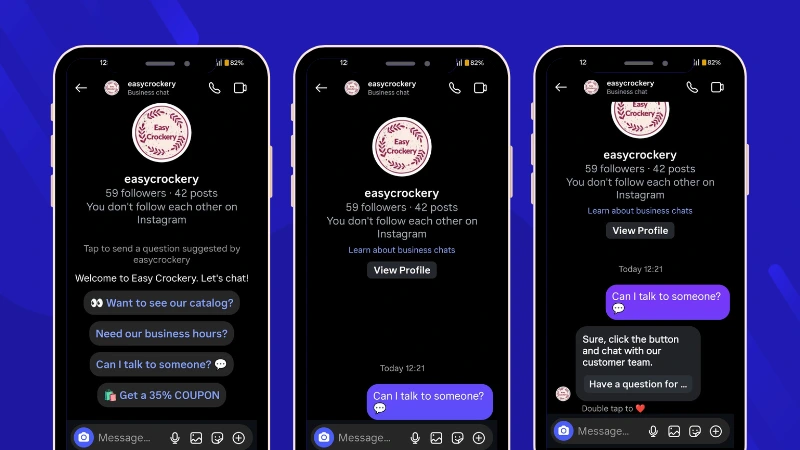
- Ice Breakers are predefined prompts that appear the first time a user opens a Direct Message conversation with a brand. They help users start the interaction with a single tap. These prompts can be configured through tools connected to the Instagram API and allow up to four questions to be created. Their main advantage is that they speed up the conversation at the first contact because clicking an option automatically triggers a response or message flow.
- The Persistent Menu is a fixed menu that remains visible inside Direct Messages and offers direct access to content, promotions, or key business information throughout the conversation. It can be used to share basic brand information, provide relevant links, or highlight long-running promotions, keeping them accessible to the user at all times. This menu can be configured through tools that integrate with the Instagram API.
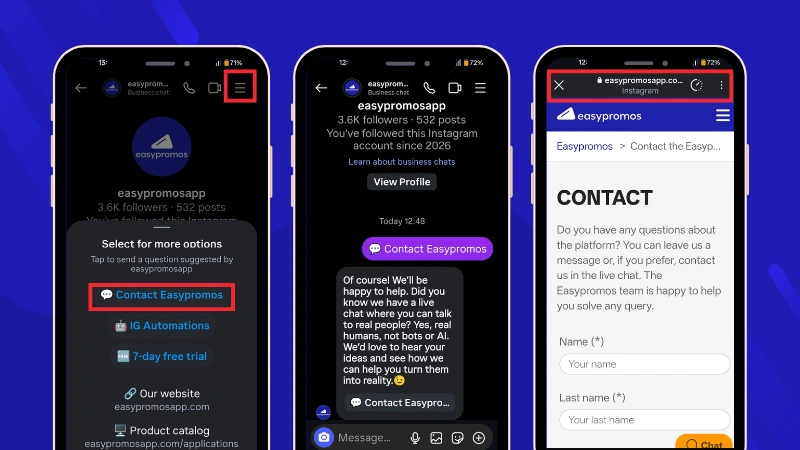
Both Ice Breakers and the Persistent Menu are only visible in the mobile version of Instagram; they are not displayed to users in the desktop version.
How to Automate Instagram Messages Step by Step
Automation is not just about sending a message when someone comments on a post or replies to a Story. The real value lies in designing a strategic journey within Instagram Direct Messages.
Before activating anything, define the objective you want to achieve: generate leads, deliver a resource, promote an offer, or resolve frequently asked questions. From there, choose the most appropriate setup and structure the conversation with a clear logic. Once the automation is live, analyze the results to understand which automations perform best and how to optimize impact.
To structure an automated conversation effectively, follow these key steps.
- Define the Objective of the Automation
A well-designed automated conversation must have a clear goal from the start. This could be encouraging a purchase with a coupon, educating users with a downloadable PDF, increasing engagement through a giveaway, capturing user data, resolving FAQs, or driving traffic to a website. Automation is not about replying for the sake of replying. It is about designing interactions with intention and configuring the tool according to that strategy.
- Design the Journey from the First Message
The first message should contextualize the user’s action. For example, if someone comments “INFO” on a Reel, the DM can confirm that they requested information, deliver the promised resource (such as a guide or catalog), and offer a clear next step with a button. The message should not close the conversation. It should open a path forward. Define where the conversation begins and how you want it to evolve.
- Offer a Valuable Resource or Incentive
Users interact via DM because they expect something in return: information, a benefit, a reward, or exclusive access. Define what incentive or resource you will offer to motivate interaction. This is where the conversation gains strategic value: the user remains inside Instagram until they decide to move elsewhere.
- Close with a Purposeful Final Message
The final message allows you to end the flow with intention: confirm that the process was completed successfully, thank the user for their interest, or suggest a next step to keep the conversation active. When used correctly, it does more than close the sequence. It reinforces the experience and can open the door to further actions within the DM channel.
- Measure and Segment from a Conversation List
Conversations managed with professional tools are recorded in a conversation list. This allows you to identify and segment users who have interacted with your brand. Automation then becomes more than an operational resource, and it turns into a strategic marketing asset. You can encourage participants to follow your account, reward them with a giveaway, identify highly engaged profiles, or design specific actions to convert them into customers.
Tips for Your Comment-to-DM Strategy on Instagram
- Define an activation keyword that makes sense and is directly related to the content or incentive the user will receive. It should be clear, easy to remember, and consistent with the message of the post.
- Explicitly indicate in the Reel or post that users need to comment with that keyword to receive the incentive. The clearer the call to action, the higher the initial volume of comments.
- Even if the message is sent automatically, make sure the DM delivers real value: a discount, a useful resource, access to a promotion, or exclusive content. Automation should not feel empty.
- Monitor the comments to avoid spam and maintain the quality of the conversation. Automation does not replace human judgment in community management.
- Reinforce the strategy by combining it with Stories to generate new interactions that can move into DMs.
- Continue responding manually to comments that do not include the activation keyword. This maintains a sense of closeness and strengthens an authentic community beyond the automated dynamic.
Structuring an automated DM conversation means designing a clear journey inside the channel: triggering the conversation from a real interaction, delivering immediate value, and guiding the user toward a specific action. All within Instagram and with the ability to measure results.
Tools to Automate Instagram Messages
To automate Instagram messages, you need tools that allow you to configure automated responses and manage conversations in Direct Messages. Some basic functions can be configured directly using Meta’s native tools, while more advanced automations require specialized platforms connected to the official Instagram API.
Basic automations with Meta Business Suite
With Meta Business Suite, Instagram’s native tool, you can configure several automatic actions:
- Basic automatic replies in Direct Messages
- A welcome message when someone starts a conversation
- Saved quick replies that can be copied and pasted manually
- An away message outside business hours
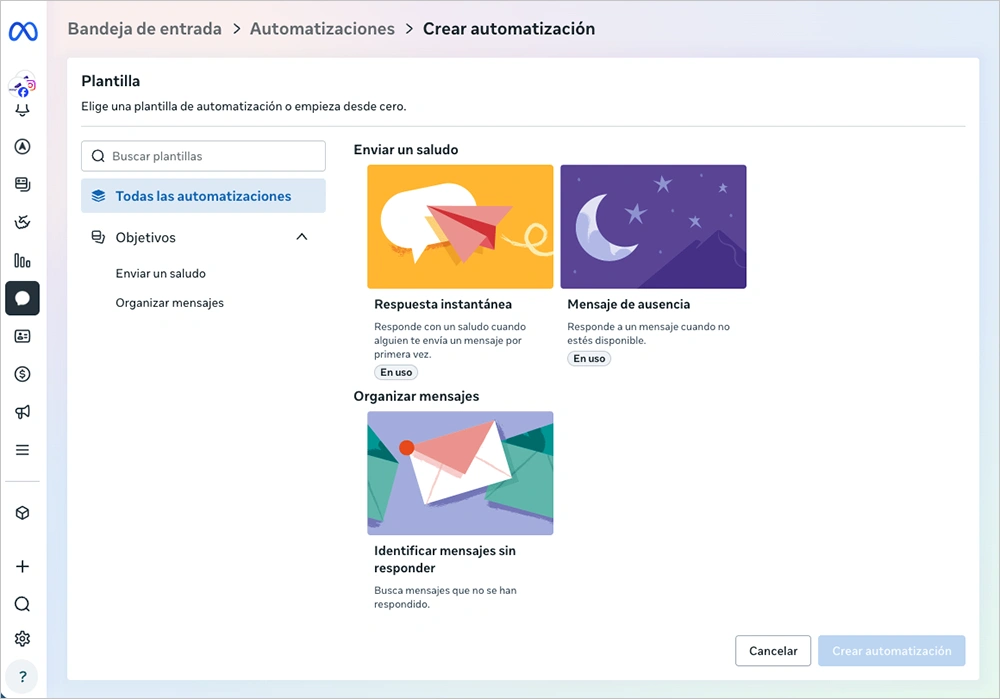
However, these options have important limitations. They do not trigger automatically when someone comments on a post using a keyword. They cannot detect keywords in comments or messages to activate flows. They do not allow you to structure journeys with buttons, dynamic links, or message sequences, nor connect the conversation with promotions or other advanced actions. They save some time, but the impact is limited.
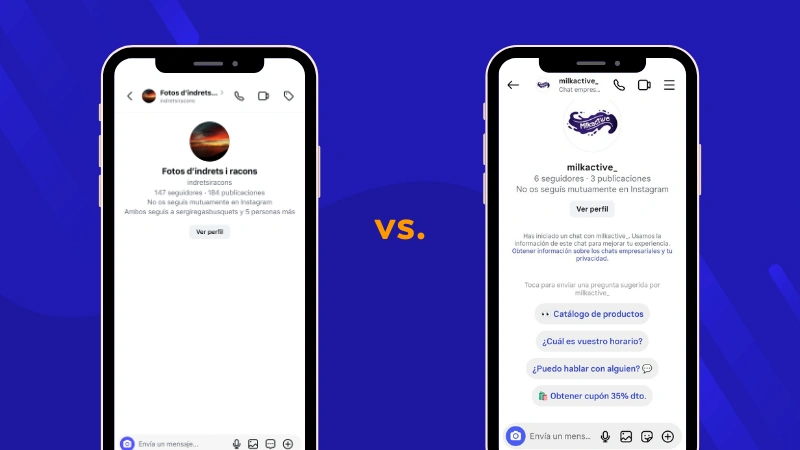
In any case, let’s see how these options are configured to better understand how basic message automation works using only Instagram’s native tools.
Enable a welcome message when someone starts a conversation
The instant reply is automatically sent when someone sends their first message or starts a chat.
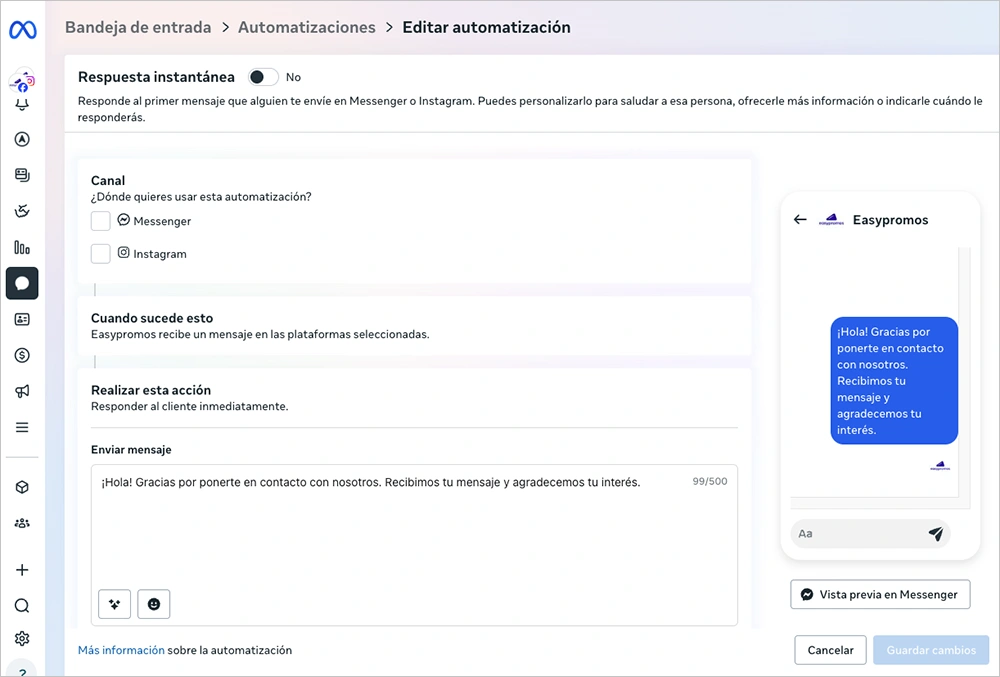
How to configure it
- Go to Meta Business Suite and access the connected Instagram account
- Go to Inbox > Automations
- Select Instant Reply
- Activate the automation
- Edit the automation with the response message
Example: “Thanks for contacting us. We’ve received your message and will respond as soon as possible.”
It is important to remember that this message is sent only once per conversation and does not replace the manual reply that may follow.
Create saved quick replies to copy and paste manually
This feature is not an automation, but a response shortcut system. It allows you to save predefined messages that the account manager can quickly insert by typing a previously configured command or keyword.
The message is still sent manually. The team must open the conversation, type the shortcut, and send the message. It does not trigger automatically when a user starts a chat or uses specific words.
In addition, it does not allow you to structure an automated journey with buttons or follow-up actions. Although this option saves time compared to writing each response from scratch, it does not guarantee that users will receive an immediate reply when they start the conversation, since it depends on the availability of the account manager.
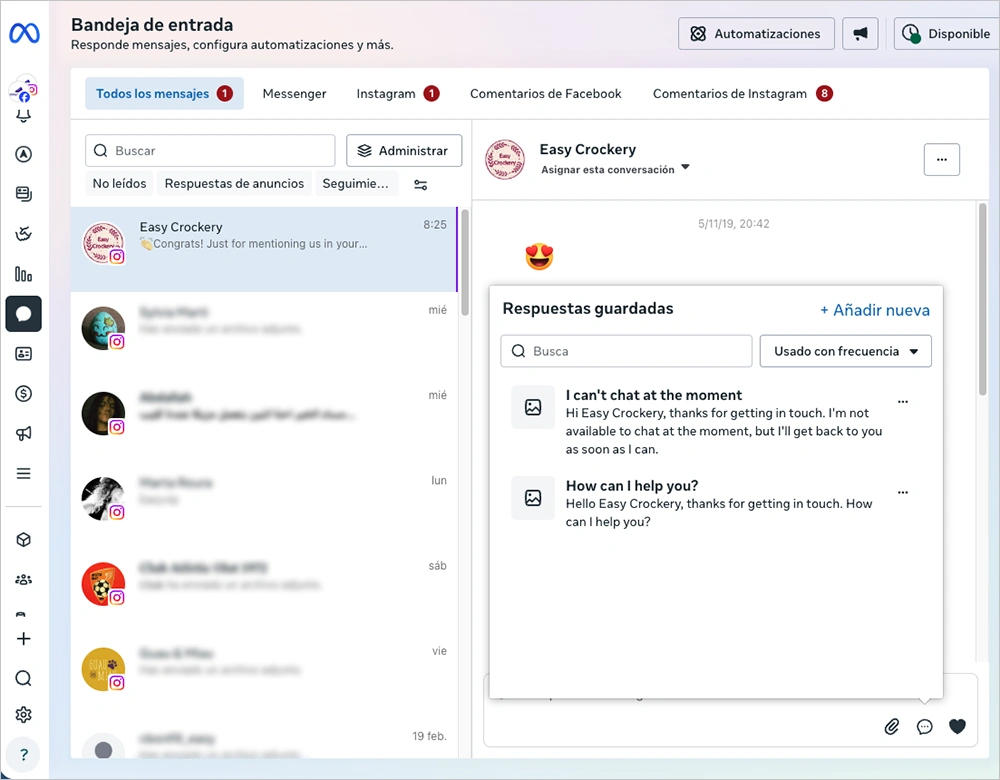
How to configure it
- Go to Meta Business Suite and access the connected Instagram account
- Go to the Inbox
- Open any conversation
- Click the saved replies icon (speech bubble or lightning icon, depending on the version)
- Create a new saved reply
- Assign a shortcut (for example: /hours)
To use this feature, type the shortcut word so the saved message appears. For example, typing /hours in a conversation automatically fills in the text you previously saved.
Set an away message outside business hours
To activate an away message, you need to update your status to “Away” in the inbox or schedule specific hours while editing the message. For example, you can customize the message to inform users how long you will be unavailable and when they can expect a response.
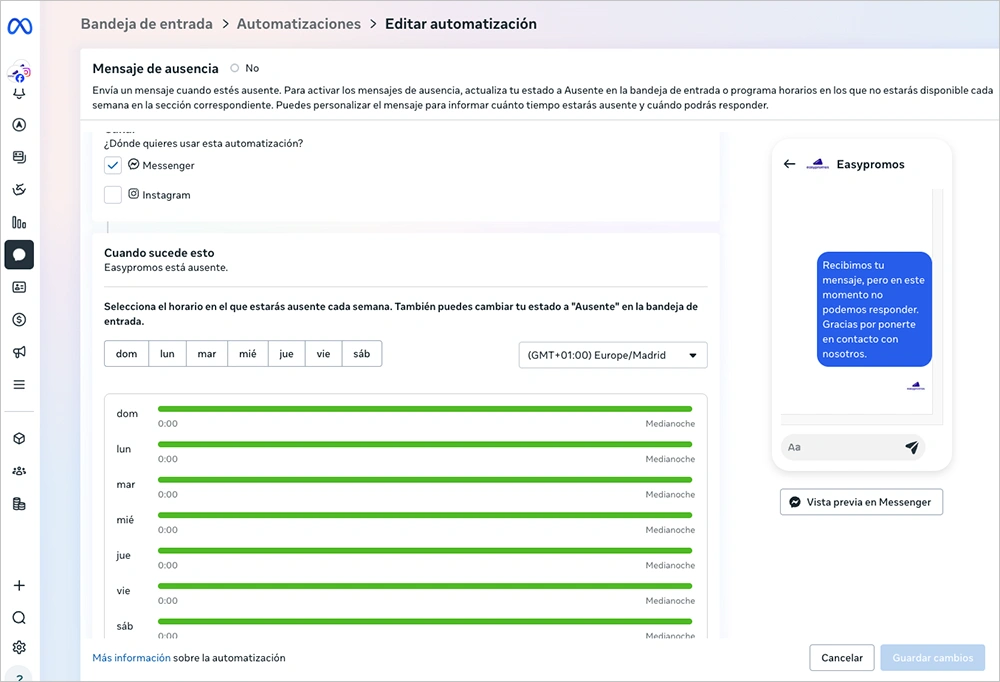
How to configure it
- Go to Meta Business Suite and access the connected Instagram account
- Go to Inbox > Automations
- Select Away message
- Activate the automation
- Edit the automation with the schedule and the response message
Example: “Our support hours are Monday to Friday from 9:00 to 18:00. We have received your message and will respond as soon as we return.”
Beyond these automations, Meta does not offer many additional options. For this reason, many brands look for external solutions to optimize the management of the DM channel.
Advanced platforms to automate Instagram Direct Messages
When a brand wants to go beyond basic automatic replies, it needs specialized platforms that allow more advanced automation in Instagram Direct Messages. These tools connect to the official Instagram API and can automatically trigger conversations when users interact with the brand’s content.
For example, with Instagram Messaging Automations by Easypromos, it is possible to start automatic conversations in DMs when a user comments on a post, replies to a Story, mentions the account, or sends a Direct Message. From that interaction, you can send links, resources, promotions, or access to interactive experiences directly inside the conversation.
Not all solutions that automate Instagram messages offer the same level of control and scalability. If the volume of interactions grows or if the DM channel becomes part of the commercial strategy, the platform must meet certain key requirements:
- Trigger automations from real interactions: keyword comments, Story replies, mentions, or incoming Direct Messages. Automation should respond to specific user actions rather than depend on manual sending.
- Send links and resources in a structured way: not just text, but buttons, downloads, or access to content that extends the conversation.
- Connect conversations with promotions, giveaways, or interactive experiences: this transforms the DM channel from a simple response space into an entry point for richer engagement.
- Identify and count the users who have interacted: it is not enough to count messages sent. You need to know how many people started a conversation, what triggered it, and what the outcome was.
- Avoid relying on developers for configuration whenever possible: implementation and management should be simple and fast. Marketing teams should be able to create, modify, and activate automations independently.
- Scale interaction volume without losing control or traceability: if a campaign generates hundreds or thousands of interactions, the structure should remain stable and measurable.
When these criteria are met, automation stops being a one-off solution and becomes part of a structured engagement and lead generation strategy within Instagram.
Try Easypromos’ Instagram Messaging Automation now. Free access, no credit card required, and a 7-day trial.
Common Mistakes When Automating Instagram Messages
Before implementing automations in the DM channel, it is important to consider some common mistakes that can reduce their effectiveness. Automation can provide significant value, but only when it is approached strategically. These are the five most common mistakes when implementing automations:
- Automating isolated replies only. Setting up a single automated message without continuity turns automation into nothing more than a quick reply. If there is no follow-up path, button, resource, or next step, the conversation ends prematurely and the opportunity is lost.
- Not connecting the conversation to a concrete action. The DM channel should not be limited to providing information. It can serve as the entry point to a promotion, a downloadable resource, or a participatory mechanic. Without a clear action, the impact remains superficial.
- Failing to measure real impact. Many accounts activate automations but do not analyze results. They do not know how many unique users initiated a conversation, which activation performed best, or which resource generated the most clicks. Without measurement, the channel cannot be optimized.
- Not structuring the conversation flow. Automatically replying is not the same as designing a structured flow. Without a clear sequence, users receive fragmented information with no guidance. A well-designed automated conversation should guide, not just respond.
- Confusing automation with basic customer support. Automations are not only meant to answer frequently asked questions. Their potential goes further: they can activate campaigns, generate leads, deliver content, and turn interaction into business opportunities.
When these mistakes are avoided, the DM channel stops being a reactive inbox and becomes an organized, measurable space aligned with your broader digital strategy.
Automating Instagram DM Messages FAQs
Yes, through tools and solutions that integrate with the official API. The Instagram Login API is Meta’s official system that allows external platforms to securely connect with professional accounts and manage interactions such as Direct Messages and comments. The automations available in Meta Business Suite are basic and limited to welcome messages or saved replies. In contrast, tools like Easypromos, which work with the official API, allow you to create more advanced flows: trigger conversations from comments or Stories, chain messages with buttons, and structure automated journeys within DMs.
Public replies in the comment section cannot be automated directly. However, you can automate the sending of a private message when a user comments with an activation keyword. In this case, the automation detects the keyword and moves the interaction to the Direct Message channel, where the conversation starts automatically.
No. There are solutions that allow you to configure automations without technical development.
Not necessarily. When implemented correctly, automation improves response speed and creates a smoother experience for users.
Automating Instagram messages allows brands to turn common interactions into structured conversations within the DM channel. When a clear flow is designed and connected to resources, promotions, or relevant content, the private chat stops being just a response channel and becomes a strategic tool for generating engagement and business opportunities.