The right format depends on what you want participants to do and what you want the campaign to achieve. It also matters where participation takes place, because Meta’s promotion requirements affect what brands can ask users to do directly on Facebook. For example, sharing a post on a personal timeline or tagging friends cannot be required as a condition of entry.
In this guide, we’ll explain how to run a Facebook contest or competition, explore different contest formats and real examples, and look at the Facebook promotion requirements and other rules you should consider before launching your campaign.
If your goal is specifically to run a random giveaway based on comments or reactions, we’ll also show how a Facebook Giveaway fits within these broader contest options.
What Types of Facebook Contests Can You Run?
A Facebook contest does not have to use Facebook itself as the participation platform. Brands can either collect entries directly from a Facebook post or use Facebook to drive users to an externally hosted promotion.
Some of the most common formats include:
- Facebook Giveaways: Participants enter by commenting on or reacting to a Facebook post or Reel. This is the simplest option when you want to select winners randomly from engagement on the post.
- Photo contests: Participants submit photos through a dedicated campaign site. Entries can then be displayed in a public gallery and, if desired, opened to voting.
- Voting contests: Users vote for their favorite entries, ideas, products, or candidates through an externally hosted voting gallery.
- Quizzes and knowledge contests: Participants answer questions and can compete based on their score, completion time, or a combination of both.
- Games and instant-win promotions: Interactive formats such as Spin the Wheel, Scratch & Win, puzzles, or other games can be promoted through Facebook while participation takes place on the campaign site.
The main difference is where the entry happens. With a Facebook Giveaway, participation takes place directly on Facebook. With other contest formats, Facebook works primarily as a promotional channel that directs users to the campaign.
Run a Facebook Giveaway From Comments or Reactions
One of the simplest ways to run a contest directly on Facebook is with a Facebook Giveaway. Participants enter by commenting on a post or Reel or by reacting to it, and the winner is selected randomly from the eligible entries.
Comment-based giveaways are especially useful when you want to generate conversation around the campaign. Instead of asking users to leave a generic comment, you can ask a question related to the prize or brand, such as which product they prefer, how they would use the prize, or what they think about a particular topic.
Reaction-based giveaways require even less effort from participants, although they generate less conversation and provide less information about the audience.
Facebook’s promotion requirements do not allow organizers to make sharing a post on a personal timeline or tagging friends a condition of entry. If your campaign uses a Facebook Giveaway, keep the participation mechanic focused on actions that can be collected and verified reliably.
What Rules Apply to Facebook Contests?
When you run a contest on Facebook, there are two separate areas to consider: Facebook’s own promotion requirements and the Terms and Conditions and legal requirements that apply to your campaign.
What Facebook Does Not Allow
Facebook’s promotion policy does not allow personal timelines or friend connections to be used to administer a promotion. This means you should not require participants to:
- Share the contest post on their personal timeline
- Share it on a friend’s timeline
- Tag friends in the post as a condition of entry
You can encourage users to follow your Page, share the post, or mention other people, but these actions should not determine whether they are eligible to participate.
What You Can Ask Participants to Do
For contests run directly from a Facebook Page post, participants can enter by commenting on the post or reacting to it.
With comment-based participation, you can also ask users to answer a question, include a hashtag, or add a photo to their comment, depending on the mechanic you want to use.
For other contest formats, such as photo contests, voting campaigns, quizzes, or games, Facebook can be used to promote the campaign while participation takes place on an externally hosted page.
Publish Clear Terms and Conditions
Your promotion should also comply with the laws and regulations that apply to the organizer, participants, and prize.
Facebook’s promotion requirements state that campaigns should include:
- A complete release of Facebook by each participant
- An acknowledgment that the promotion is not sponsored, endorsed, administered by, or associated with Facebook
You should also provide accessible Terms and Conditions covering the key details of the campaign, such as eligibility, participation dates, entry requirements, prize details, how the winner will be selected, and how the result will be communicated.
The contest post and the Terms and Conditions should always describe the same mechanic and participation requirements.
Run a Facebook Photo Contest
A photo contest is a good option when you want participants to create and submit their own content rather than simply comment on a Facebook post.
In this format, Facebook is used to promote the contest and direct users to an external campaign page, where participants register and upload their photos. The submitted entries can then be displayed in a public gallery and, if the campaign requires it, opened to voting.
Using a dedicated contest platform makes it easier to manage submissions, moderate entries, collect participant data, and organize voting in one place. It also avoids relying on Facebook hashtags or manually collecting photos from different posts.
For example, Wheeling, a US rail transportation company operating several regional railroads, promoted its 2027 calendar photo contest on Facebook and directed participants to an external Easypromos campaign page to submit their photos.
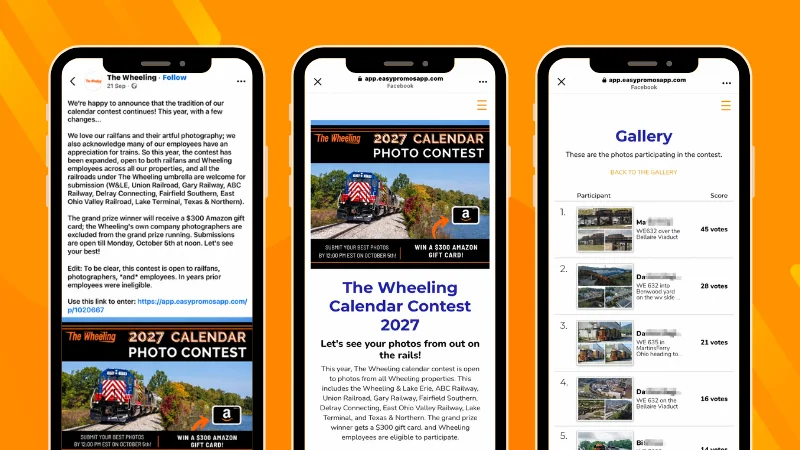
The contest was open to railfans, photographers, and Wheeling employees across its different railroad properties. Participants were invited to submit their best railway photography, with the overall winner receiving a $300 Amazon gift card.
Run Other Interactive Contests Through Facebook
Facebook can also be used to promote interactive campaigns where participation takes place on an external campaign page rather than directly in the social network.
Depending on the objective, brands can direct users from a Facebook post, Reel, Story, or ad to formats such as:
- Voting contests, where users vote for their favorite entry, product, idea, or candidate
- Quizzes and knowledge contests, where participants answer questions and can compete based on score or completion time
- Games, such as puzzles or Slide & Match, designed to increase interaction and repeat participation
- Instant-win promotions, such as Spin the Wheel or Scratch & Win, where participants discover immediately whether they have won a prize
These formats give brands more flexibility than a standard Facebook post because the participation experience can be fully customized and can also include registration forms, participant data collection, galleries, leaderboards, or prize distribution.
Facebook then works as the traffic and communication channel, while the campaign itself is managed on the external promotion site.
Example: Cellmaxs Philippines
Cellmaxs Philippines, the Philippine Facebook presence of the Cellmaxs brand, celebrated reaching 1,000 followers with a Spin the Wheel promotion shared through Facebook.
The post directed users to an external Easypromos campaign page where they could spin the wheel for a chance to win. Participation was limited to the first 500 users, and each participant could win only once.
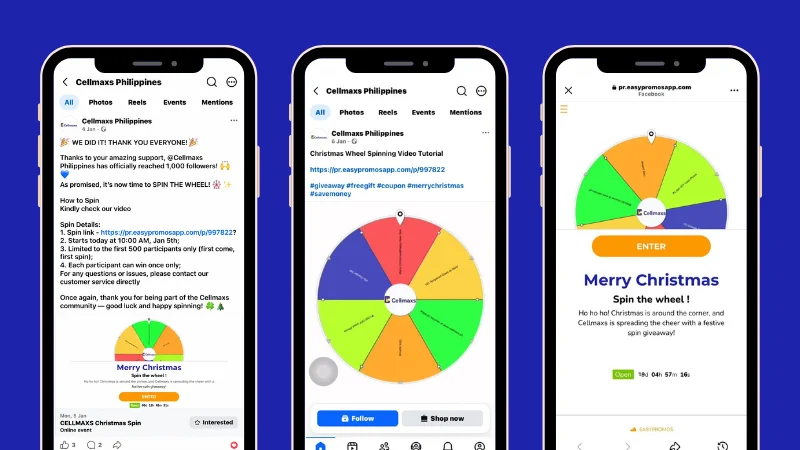
This is a good example of using Facebook as the promotion and traffic channel, while the interactive experience itself takes place on a dedicated campaign page.
Example: eMerge Americas Fan Favorite SMB Vote
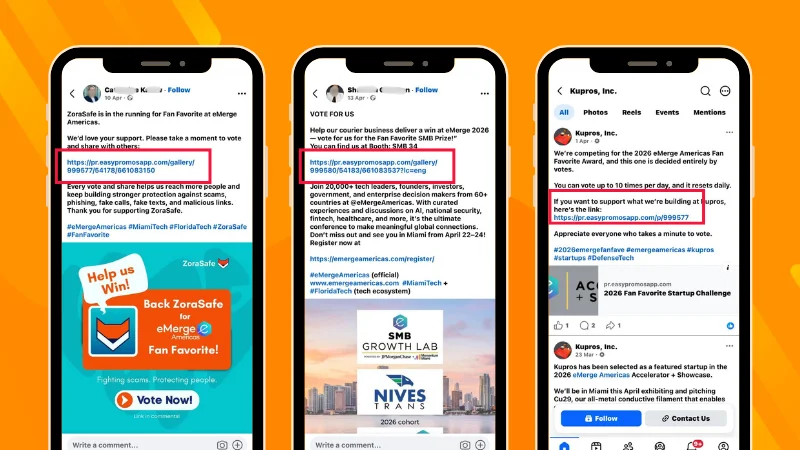
eMerge Americas, a Miami-based technology conference and innovation platform, ran a public Fan Favorite vote as part of its 2026 SMB program.
Participating businesses promoted their own entries on Facebook and directed their communities to the Easypromos online voting contest microsite. The three examples below show different contestants asking followers to support their project and sharing a direct link to vote.
This illustrates an important advantage of voting contests: participants can become active promoters of the campaign, extending its reach beyond the organizer’s own Facebook audience and driving additional traffic to the voting gallery.
How to Run a Facebook Contest Step by Step
The exact setup depends on the type of contest you choose, but the planning process is similar across most Facebook contests.
- Define the objective. Decide whether the campaign is designed to generate engagement, collect user-generated content, drive traffic, capture leads, promote a product, or reward your community.
- Choose the contest format. Select a mechanic that supports that objective, such as a Facebook Giveaway, photo contest, voting campaign, or quiz.
- Define the prize and participation requirements. Choose a prize that is relevant to your audience and make the entry process easy to understand.
- Prepare the Terms and Conditions. Clearly define eligibility, participation dates, the prize, how winners will be selected, and any other requirements that apply to the campaign.
- Create the contest and promotional content. If participation takes place directly on Facebook, prepare the giveaway post or Reel. If the contest is externally hosted, create the campaign page and use Facebook content to direct users to it.
- Promote the campaign. Use posts, Reels, Stories, ads, your website, email, and other relevant channels to drive participation.
- Manage entries and determine the winner. The process will depend on the mechanic. A giveaway may require a random selection, while a photo or voting contest may use public voting, a jury, or a combination of criteria.
- Announce the result and deliver the prize. Explain where and when winners will be announced, verify eligibility before confirming the result, and communicate the outcome clearly to participants.
The most important point is to choose the contest mechanic before deciding how to promote it on Facebook. That determines where users participate, what information you need to collect, and how the winner will ultimately be selected.
How to Promote a Facebook Contest
Once the contest is live, use Facebook to keep it visible throughout the participation period and direct users to the correct entry point.
Some useful ways to promote it include:
- Main Facebook post: Explain the contest, highlight the prize, and link directly to the participation page when entries are hosted externally.
- Pinned post: Keep the contest visible at the top of your Facebook Page while entries or voting are open.
- Stories and Reels: Use shorter formats to showcase the prize, explain how to participate, and remind followers before the deadline.
- Reminder posts: Publish updates during the campaign to maintain momentum and highlight key dates.
- Facebook Ads: Extend the campaign beyond your existing audience when additional reach supports the objective.
- Participant promotion: In voting contests, contestants may choose to share their own entry and ask their communities for support, as in the eMerge Americas example.
- Other brand channels: Promote the contest through your website, newsletter, other social networks, or offline channels when relevant.
Make sure every promotional message directs users to the correct place to participate and communicates the same dates, requirements, and prize information as the official contest rules.
How Do You Choose the Winner of a Facebook Contest?
The winner-selection method should be defined before the contest starts and explained clearly in the Terms and Conditions.
The right method depends on the contest format:
- Random giveaway: Select the winner randomly from eligible comments or reactions.
- Voting contest: Determine the result based on public votes, using appropriate fraud-prevention controls.
- Judged contest: Ask a jury to evaluate entries according to predefined criteria.
- Combined voting and jury: Use public voting to shortlist entries and a jury to make the final decision.
- Quiz or challenge: Determine the result based on score, completion time, or another clearly defined performance criterion.
Whatever method you use, apply the published participation requirements and eligibility criteria before confirming the winner. If alternates are part of the campaign, define when they can replace a winner who does not respond or does not meet the requirements.
For random Facebook Giveaways, Easypromos can import eligible comments or reactions and randomly select winners and alternates. For voting or submission-based contests, the winner-selection process should match the mechanic established for that campaign.
Common Facebook Contest Mistakes
Even a simple Facebook contest can create problems if the participation requirements, promotion, and winner-selection process are not aligned from the start.
Some common mistakes include:
- Using prohibited entry requirements. Do not require participants to share the contest on their personal timeline or tag friends as a condition of entry.
- Making the mechanic too complicated. Too many steps can discourage participation and make entries difficult to verify.
- Choosing the wrong contest format. A random giveaway, voting contest, and judged competition serve different objectives and require different winner-selection methods.
- Publishing incomplete or inconsistent rules. The Facebook post, campaign page, and Terms and Conditions should communicate the same dates, eligibility requirements, prize, and participation mechanic.
- Making the prize unrelated to the audience. A highly generic prize may attract participation without generating meaningful interest in the brand or campaign.
- Waiting until the end to decide how the winner will be chosen. The selection method and eligibility criteria should be established before participation begins.
- Failing to communicate the result. Participants should know when and where the winner will be announced and how the prize will be claimed.
Planning these details before launch helps keep the Facebook contest easier to manage and gives participants a clearer experience.
Facebook Contest FAQs
Yes. Brands can run contests directly from a Facebook Page or use Facebook to promote an externally hosted contest. The right setup depends on the participation mechanic.
Facebook contest is a broader term that can include giveaways, photo contests, voting campaigns, quizzes, and other competition formats. A Facebook Giveaway specifically refers to a random drawing where participants typically enter by commenting on or reacting to a Facebook post or Reel.
No. Facebook does not allow organizers to require participants to share a promotion on their personal timeline or a friend’s timeline as a condition of entry.
You can encourage users to mention other people, but tagging friends cannot be required as a condition of entry under Facebook’s promotion requirements.
Yes, but the most practical approach is to host the contest on an external campaign page and use Facebook to promote it. Participants can then submit their photos through the contest site, where entries can also be moderated, displayed in a gallery, and opened to voting if required.
Facebook permits promotions in Groups and Events, but third-party platforms cannot automatically retrieve comments or participation data from them through Meta’s official API. In these cases, you can use the Group or Event to promote an externally hosted contest instead.
The method depends on the mechanic. A Facebook Giveaway can use random selection, while voting contests, judged competitions, or quizzes may determine the winner based on votes, jury criteria, score, completion time, or another method defined before the campaign begins.
Ready to Run Your Facebook Contest?
A successful Facebook contest starts with choosing the right format for your objective, defining clear participation requirements, and deciding how the winner will be determined before the campaign goes live.
Whether you run a giveaway directly from a Facebook post or use Facebook to promote a photo contest, voting campaign, or other competition, make sure the participation mechanic, Terms and Conditions, and promotional messages all stay consistent.
If you want to run a random drawing from comments or reactions, explore the Facebook Giveaway. For other contest formats, Easypromos lets you create and manage externally hosted campaigns that you can promote through Facebook.