At that point, practical questions start to arise:
- How do we identify which location each participant is joining from?
- How do we manage prize inventory for each store?
- How can we verify that participants are actually at the location?
- Which stores are generating the most participation?
- Do we need a different QR code for every store?
- Can we manage the entire campaign without creating a separate promotion for each location?
From our experience, these are some of the most common questions brands ask when running promotions for retail chains, franchises, supermarkets, restaurant groups, gyms, dealerships, or any organization with a network of physical locations.
In these campaigns, the challenge is not simply creating the promotion. The real complexity lies in managing every location effectively: identifying where each participant joins, verifying that they are physically present, controlling prize inventory, and comparing results across the entire network.
With the Locations feature in Easypromos, brands can create a single promotion for their entire network and communicate it through one QR code. When participants access the campaign, the platform can verify their location and confirm that they are physically present at one of the participating locations.
The result is a much simpler way to run promotional campaigns across multiple locations, with greater control and far less operational effort.
Below, we’ll explore the main capabilities of the Locations feature.
1. The Priority: Drive Customers to Your Stores
The primary goal of an in-store promotion is to bring more people into your physical locations. That’s why participant geolocation is at the core of the Locations feature in Easypromos.
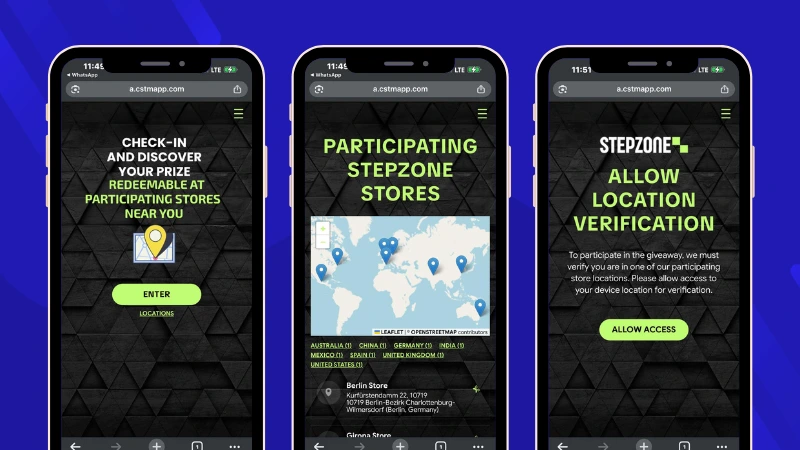
Geolocation makes it possible to verify that participants are physically present at one of the stores or participating locations before allowing them to join the promotion.
This is particularly important because many in-store promotions are promoted through a QR code displayed at the location, whether on a poster, countertop display, shelf, window, or other point-of-sale material. Customers simply scan the QR code with their phone to access the promotion.
The challenge arises when someone takes a photo of that QR code or shares it through WhatsApp or other messaging apps. The promotion still works, but it loses one of its main objectives: ensuring that participants have actually visited the location.
With location-based participation enabled, the experience changes. Participants can still access the promotion by scanning the campaign’s QR code, but before participating, they’ll be asked to grant permission to verify their location. If they are within the predefined radius of one of the participating stores, they can continue normally. Otherwise, they won’t be able to participate until they visit an authorized location.
This transforms the promotion into much more than a way to collect data, distribute prizes, or increase engagement. It also becomes an effective tool for driving in-store visits.
This capability is especially valuable for brands looking to activate their store network, increase foot traffic, or reward only those customers who have actually visited a participating location.
From the participant’s perspective, the experience remains simple. They only need to scan the campaign’s QR code and allow location access on their mobile device. The platform verifies their location automatically and associates the participation with the corresponding store.
This requirement is particularly useful for promotions such as:
- In-store prize wheels
- Digital loyalty cards
- Digital Scratch & Win promotions
- Visit-and-win campaigns
- Promotional activations at trade shows or events
- Exclusive promotions for customers visiting a specific store
- Campaigns designed to encourage repeat visits to physical locations
2. Manage Hundreds of Stores from a Single Promotion
One of the biggest challenges of running promotions across multiple locations is campaign management. If a brand has 200 stores, no one wants to create 200 separate promotions.
In that scenario, creating a different promotion for every store quickly becomes a major operational burden. Marketing teams have to manage different copy, dates, prizes, and participation rules for each location. If a campaign update is needed, the same change has to be repeated across every promotion.
With the Locations feature in Easypromos, every store or location is managed from a single promotion. The campaign organizer defines the promotional mechanic they want to run, whether it’s a prize draw, prize wheel, scratch-and-win, or another experience, and then adds all the participating stores (locations) where the campaign will be available.
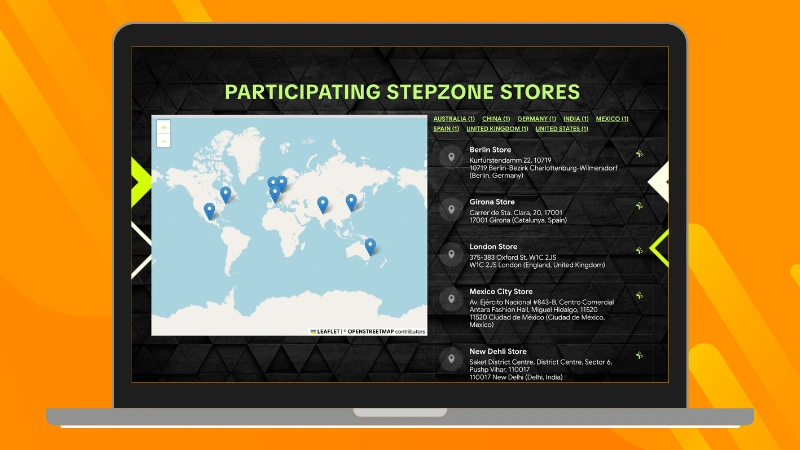
Locations can be created individually or imported in bulk using a spreadsheet. Each location includes its name, address, city, and geographic coordinates. Additional information such as a phone number, website, description, or internal reference can also be added to make each location easier to identify.
As an added benefit, all participating locations can be displayed on a public interactive campaign map. This allows participants to quickly find the nearest store, see which locations are taking part, and know where they can participate or collect a prize.
Because the entire campaign is managed from a single promotion, any updates to copy, dates, images, or participation rules only need to be made once. The changes are automatically applied across every participating location, significantly reducing setup time and eliminating the need to maintain dozens or even hundreds of duplicate promotions.
Another benefit, although often overlooked, is that the same QR code can be used across every store. Whether you’re printing posters, countertop displays, or other point-of-sale materials, every location uses exactly the same QR code. This simplifies production and distribution while eliminating errors caused by managing different QR codes for different stores.
3. Control Prize Inventory for Every Store
Prize management is another common challenge in promotions that involve multiple locations.
Imagine a retail chain with 150 stores planning to give away 3,000 products during a campaign. Naturally, not every store will have the same number of prizes available. Some locations may receive a larger inventory, while certain prizes may only be available at selected stores.
Traditionally, one solution has been to create a different prize for every store. However, as the number of locations grows, this approach quickly becomes difficult to manage.
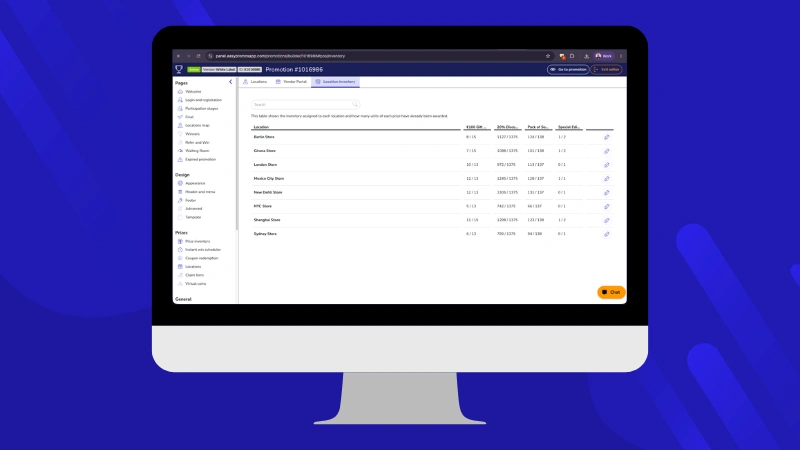
With the Locations feature in Easypromos, each prize only needs to be created once. Prize units can then be distributed across all participating stores. Every location has its own prize inventory, and the platform automatically assigns prizes based on the participant’s location.
For example, imagine you’re running a prize wheel promotion. If someone participates from Store X, the platform only considers the prize inventory assigned to that location. In other words, participants can only win prizes that are actually available at the store where they are participating.
If, during the campaign, one store starts distributing prizes much faster than expected, you can easily reallocate inventory to another location or add more prize units without modifying the promotion itself.
This gives brands a centralized view of prize inventory across the entire campaign while preventing common issues such as awarding more prizes than are available at a particular store or relying on spreadsheets to manage inventory.
4. See Which Stores Generate the Most Participation
Another advantage of working with locations is that every participation is automatically linked to a specific store. This gives marketing and trade marketing teams access to valuable location-level data.
With a standard promotion, you can see how many people participated, how many prizes were awarded, or how many users registered. But when a campaign runs across a network of stores, you need a deeper level of insight. You need to understand what’s happening at each individual location.
How many participations has each store generated?
Which locations are doing the best job of promoting the campaign?
Which franchisees are driving the highest customer engagement?
Which regions are generating the most activity?
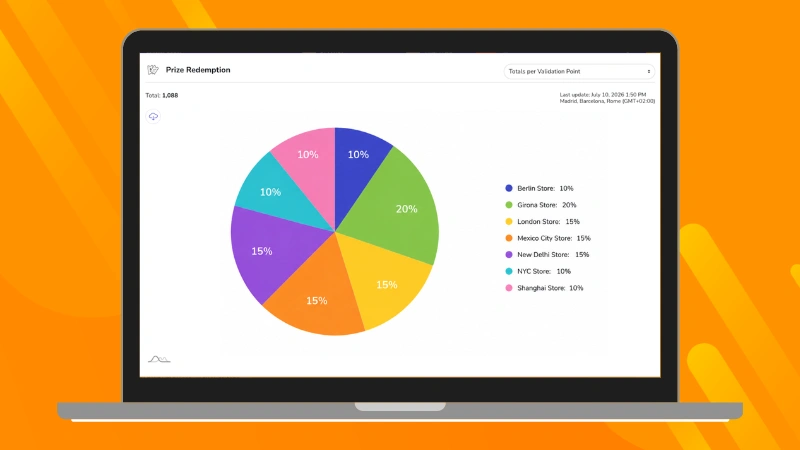
With the Locations feature in Easypromos, all this information is available through location-level analytics. Brands not only gain a complete view of overall campaign performance but also detailed insights into the results of every participating store.
This information makes it easy to identify which locations are performing well and which may need additional support, greater visibility, or clearer internal communication.
Easypromos also lets brands create performance rankings based on the number of participations generated by each store. These rankings are useful not only for measuring campaign performance but also for motivating local teams and encouraging healthy competition across the store network.
In many cases, simply showing each store where it ranks compared to the others is enough to encourage teams to promote the campaign more actively to every customer who visits.
5. Give Every Store More Autonomy Without Losing Centralized Control
When a promotion runs across dozens or even hundreds of stores, the marketing team can’t manage every day-to-day task from headquarters.
Store employees need a simple way to validate prizes, access campaign information, and resolve routine questions without depending on the central marketing team.
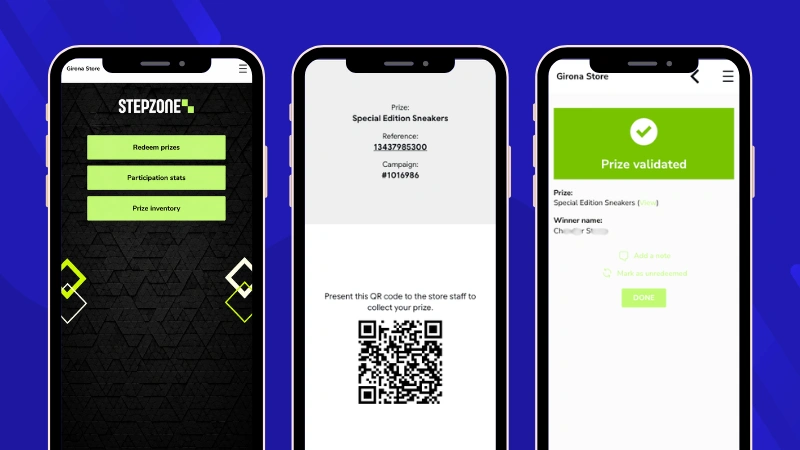
To support this, Easypromos includes the Location Staff Portal, a web-based portal that employees can access from any computer, tablet, or mobile device.
From the portal, staff can:
- Validate coupons and instant prizes
- Scan QR codes to register purchases
- View the number of participations generated by their store
- Check the prize inventory available at their location
- View the ranking of participating stores
One of the portal’s biggest advantages is that each employee only has access to the locations assigned to them. Brands maintain centralized control over the entire campaign, while each store has access only to the tools and information needed for day-to-day operations.
The result is a much simpler operational workflow and greater engagement from local teams throughout the campaign.
6. Much More Than Store Promotions
Although retail chains are often the first use case that comes to mind, the Locations feature can be used in any campaign where it’s important to verify that participants are physically present at a specific location.
For example:
A gym chain can reward members for checking in at its facilities.
A restaurant franchise can run an exclusive prize wheel promotion for customers visiting any of its locations.
A dealership network can launch a promotion during a new vehicle launch and compare participation across dealerships.
A shopping mall can organize a shared campaign involving all its retailers and identify which stores generate the highest participation.
Trade shows, festivals, and other events can restrict participation to people who are physically present at the venue.
In every case, the concept remains the same: one promotion, one configuration, and centralized management for every participating location.
Conclusion
Digital promotions are no longer limited to online experiences. More and more brands are using them to attract customers to physical locations, encourage repeat visits, and activate networks of stores and points of sale.
However, when a campaign spans dozens or hundreds of locations, managing everything efficiently becomes a challenge without the right tools.
With the Locations feature in Easypromos, brands can manage an entire campaign from a single promotion, verify that participants are physically present at the point of sale, control prize inventory for every store, compare performance across locations, and give local staff the tools they need to support day-to-day campaign operations.
The result is a much simpler way to run promotional campaigns for retail chains, franchises, restaurants, gyms, dealerships, shopping malls, or any organization with multiple physical locations.
If you’re planning to launch a promotion across a network of physical locations, create a free Easypromos account and discover everything the Locations feature can do.