Multi-Path Quiz
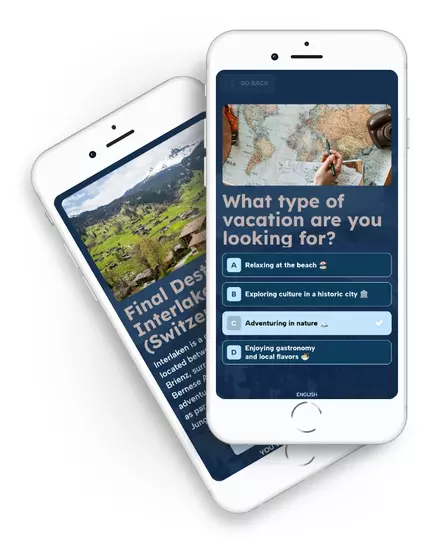
Guide your audience to the ideal product or solution with an interactive quiz that adapts dynamically based on each participant’s answers. Each answer opens a different path, presenting new questions adapted to every scenario and creating a personalized interactive experience with tailored outcomes. It’s ideal for product recommendations, interactive guidance, and personalized lead qualification experiences. You can also use it to create “choose your own adventure” experiences and increase engagement with your audience.
Table of contents
Try our Multi-Path Quiz examples


Multi-Path Quiz Main Features
-
Three combinable screen types
Combine multiple-choice questions, open text questions with optional automatic validation, and transition screens to display messages or guide participants before the next step. These screen types help you create clearer, more dynamic journeys that adapt to every participant decision. -
Visual editor with branching logic
Design your quiz flow visually and intuitively. The editor displays all questions and answers on a visual canvas where you can create branching paths using simple drag-and-drop actions. Connect each answer to the next stage and build personalized participant journeys quickly and easily. -
Questions with text and images
Add images or illustrations to each question to provide context and make the quiz easier to understand. You can offer as many answer options as needed and display personalized feedback messages after each choice to create a more interactive experience. -
Personalized final results
Create different outcomes based on each participants’ answers. Each route can lead to a unique result or display the same final message across multiple paths, depending on the participant’s responses. Decide whether each route is considered a valid ending or whether participants should retry the quiz, and assign prizes or personalized messages to each final outcome. -
Number of quiz attempts
Choose how many times each participant can complete the quiz. If you want participants to explore different routes or discover alternative outcomes, allow multiple attempts to encourage curiosity and increase engagement. -
Automate actions based on quiz results
Each final result can trigger automatic actions such as personalized prizes, tailored email workflows for different participant profiles, or participant behavior analysis based on their quiz journey. -
User registration
Choose whether your quiz is anonymous or requires participant registration to access the experience. The built-in identification and registration system allows you to capture new leads or connect the quiz with your existing user database through SSO integrations.
Sign up and create your Multi-Path Quiz
From the administration panel, you can create and configure your Multi-Path Quiz, explore all available options, and preview exactly how it will look before publishing.
Multi-Path Quiz Pricing
-
 Premium Plan$199USD/month
- Limited to 10,000 participants per campaign
- Easypromos branding visible
- Customize the design template with your own text and images
- Fully customizable registration form with support for all field types
- Automated email platform
- Integrations with external platforms and CRM tools
- Advanced statistics and participant analytics
-
 White Label Plan$399USD/month
- Limited to 50,000 participants per campaign. Contact us for larger campaigns
- No visible Easypromos branding
- No Easypromos references when sharing the campaign
- Create multilingual campaigns from a single promotion
- Use your own custom domain
- Developers: Add your own CSS, HTML, and JavaScript code
- Developers: Access the API and webhooks to export participation data in real time
- Recommended plan for large brands and agencies
- Priority support
Combine it with
-
Entry Form GiveawayReward all participants with a final prize drawing.
-
Distribute coupon codesCreate and distribute coupons to all participants or only to those who achieve a specific result.
-
Instant WinIf you want to reward participants randomly, combine the Multi-Path Quiz with instant win mechanics after participants complete the quiz and register.
-
All-in-OneYou can also create a multistage interactive campaign: for example, start with a Multi-Path Quiz and unlock other campaign mechanics such as Spin the Wheel or Scratch & Win once the participant completes the experience.
Full Features
- Responsive and mobile-friendly design
- Simple and intuitive control panel
- Widgets to embed the quiz on any website
- Dedicated quiz URL to share across all channels
- Full design customization
- Multiple user identification systemsMore info
- Export participant data and access advanced statistics
- Automated email workflows More info
- Social sharing and follow tools